🖥️ Frontend Architecture
This documentation describes in detail the architecture, components, and state management of the frontend (server/frontend). The application is a Single Page Application (SPA) based on React, Vite, TypeScript, and Tailwind CSS.
📂 Project Structure
The structure follows a Feature-First Approach, where code belonging to a specific domain area is grouped together.
src/
├── features/
│   ├── app/                              # Application shell
│   │   ├── App.tsx                       # The providers and the RouterProvider
│   │   ├── router.tsx                    # createBrowserRouter: /login, and the shell behind ProtectedRoute
│   │   ├── routes.tsx                    # The route tree: paths, sidebar entries, titles, error elements
│   │   ├── routeElements.tsx             # What the tree renders: ClientBoundary, the redirects, NotFound
│   │   ├── routeContext.ts               # useRouteClient: the client of the route above
│   │   ├── lazyPages.ts                  # The page components, loaded on demand
│   │   ├── AppLayout.tsx                 # The dashboard shell: sidebar, badges, document title, outlet
│   │   ├── RouteError.tsx                # The errorElement of every area: not found, or what went wrong
│   │   ├── HeaderBreadcrumb.tsx          # The trail to the open page, as the heading of its first card
│   │   ├── context/
│   │   │   ├── BreadcrumbContext.ts      # The trail AppLayout computes, and useCrumbs
│   │   │   ├── WebSocketContext.ts       # WebSocket context object and useWebSocket hook
│   │   │   └── WebSocketProvider.tsx     # WebSocket connection; writes each message into the query cache
│   │   └── lib/dashboardMessages.ts      # Parses a socket message against the contract; assertNever
│   ├── auth/
│   │   ├── AuthContext.ts                # Auth context object and useAuth hook
│   │   └── AuthProvider.tsx              # Authentication state
│   ├── clients/                          # Client management
│   │   ├── confirmations.ts              # Delete-client text
│   │   ├── lib/
│   │   │   ├── clientForm.ts             # The client editor's draft, its request and its rules (pure)
│   │   │   ├── addClientForm.ts          # Whether the add-client flow holds anything to lose (pure)
│   │   │   └── offlineNotice.ts          # What an offline client's page says in place of its instances (pure)
│   │   └── components/
│   │       ├── ManagedClients.tsx        # Container for client list & actions
│   │       ├── ClientList.tsx            # Paginated client data table
│   │       ├── ClientOverview.tsx        # Detail view for a single client: header + keepalived
│   │       ├── ClientIdentityCard.tsx    # The client's own fields; shows the form the editor holds
│   │       ├── ClientEditor.tsx          # The page that edits a client: holds the form and the guard
│   │       ├── ClientLabel.tsx           # Dot and name of a client, for the rows that name one
│   │       └── add-client/               # One wizard for both connection modes
│   │           ├── AddClientWizard.tsx   # Mode choice, then the inbound or outbound branch
│   │           ├── useAddClientForm.ts   # Form state, held above the wizard
│   │           └── steps/                # StepConnectionMode, StepInboundDetails, StepOutboundDetails
│   ├── dashboard/                        # The landing page
│   │   ├── lib/dashboard.ts              # What the cards and the sidebar badge count
│   │   └── components/
│   │       └── DashboardOverview.tsx     # Numbers, the list behind each, clusters in trouble
│   ├── keepalived/                       # VRRP: clusters, a host's instances
│   │   ├── lib/vrrp.ts                   # State colours, cluster health labels, counter groups, formatting
│   │   ├── hooks/useVrrpClusters.ts      # buildVrrpClusters over the cache, recomputed live, hosts named
│   │   └── components/
│   │       ├── ClusterOverview.tsx       # Every cluster as a tree, the troubled ones first
│   │       ├── MasterList.tsx            # The instances in MASTER, opened from the dashboard
│   │       ├── ClusterCard.tsx           # One virtual router and its members across hosts
│   │       ├── ClusterDetail.tsx         # One cluster: details, hosts, counters, history
│   │       ├── ClusterHealthBadge.tsx    # A cluster's health, explained in the tooltip
│   │       ├── VrrpInstanceView.tsx      # Instances as table or list, with or without a host column
│   │       ├── VrrpStateBadge.tsx        # One badge per VRRP state
│   │       └── ClientKeepalivedPanel.tsx # One host: instances and sync groups
│   ├── activity/                         # What happened, as structured events
│   │   ├── confirmations.ts              # Delete-all text
│   │   ├── components/
│   │   │   ├── ActivityGroupSteps.tsx    # The members of one correlated group
│   │   │   ├── ActivityLevelIcon.tsx     # One icon per level, wherever an event is listed
│   │   │   └── ActivityView.tsx          # The page at /activity
│   │   ├── hooks/useProblemToasts.ts     # A new error or warning as a toast, on whatever page is open
│   │   └── lib/
│   │       ├── groupActivity.ts          # Folds the flat list into rows by correlationId
│   │       ├── activityLinks.ts          # Where an event's chips lead: its host, its cluster (pure)
│   │       └── problemToasts.ts          # Which events are reported as a toast, and how (pure)
│   ├── webhooks/                         # Webhooks: list and editor, each a page
│   │   ├── confirmations.ts              # Delete-webhook text
│   │   ├── lib/webhookForm.ts            # Draft <-> API shape, its rules, preview, placeholder list
│   │   └── components/
│   │       ├── WebhookOverview.tsx       # The page at /webhooks: loads, deletes, opens the editor
│   │       ├── WebhookList.tsx           # DataMultiView of the targets and their last delivery
│   │       └── WebhookEditor.tsx         # /webhooks/new and /webhooks/:id, with live preview and "Send Test"
│   ├── users/                            # User management
│   │   ├── confirmations.ts              # Delete-user and last-user texts
│   │   ├── lib/userForm.ts               # The user dialog's draft, its request and its rules (pure)
│   │   └── components/
│   │       ├── UserOverview.tsx
│   │       ├── UserList.tsx
│   │       └── UserDialog.tsx
│   ├── settings/                         # The settings page's sections
│   │   ├── sections.ts                   # The two tabs, the keys each one saves, and what the server would refuse
│   │   ├── lib/runResult.ts              # describeRunResult: a scheduler run's result in words
│   │   └── components/
│   │       ├── SettingsSections.tsx      # One component per section
│   │       ├── SchedulerBox.tsx          # Status, last and next run of a scheduler, and Run Now
│   │       └── SettingsParts.tsx         # ManualRun: the library's, reading a failure the app's way
│   └── tokens/                           # Registration token management
│       ├── confirmations.ts              # Delete-token text
│       └── components/
│           ├── TokenOverview.tsx
│           ├── TokenList.tsx
│           └── TokenModal.tsx
├── components/
│   ├── confirmations.ts                  # The question asked when an editor with unsaved changes is left
│   ├── RelativeTime.tsx                  # "5 min ago" on the shared clock, the date in the tooltip
│   ├── NotFoundCard.tsx                  # A page whose subject does not exist, with the way back
│   ├── entityHeader.ts                   # The title size of a header whose title is the breadcrumb
│   └── QueryError.tsx                    # A page whose data could not be read, with the server's reason
├── hooks/
│   ├── useSearchQueryParam.ts            # Search box and active tab, held in the URL
│   ├── useNow.ts                         # One shared clock for what is shown as a distance from now
│   ├── useBackPath.ts                    # Where closing a page leads: its parent in the route tree
│   ├── useEscapeToLeave.ts               # Escape on a detail page leads back, unless a field has focus
│   ├── useSearchHotkey.ts                # `/` puts the cursor into the search of the list on screen
│   ├── useEntityForm.ts                  # An editor's draft, its baseline and its save, checked against a schema
│   └── useUnsavedChangesGuard.ts         # One question for every way out of a changed editor
├── lib/
│   ├── api.ts                            # The API client: checks every response against its schema
│   ├── apiFetch.ts                       # Below it: the session cookie and the central 401 handling
│   ├── queryClient.ts                    # The one query cache; readUnlessPushed
│   ├── queryKeys.ts                      # Every key the cache is addressed by
│   ├── cacheUpdates.ts                   # How a message or an answer changes a cache entry (pure)
│   ├── storageKeys.ts                    # Every key in the browser's storage, once: kasm.<area>.<what>
│   ├── paths.ts                          # Every path pattern and path builder, once
│   ├── backPath.ts                       # parentPath: the nearest route above that is another place
│   ├── pageTitle.ts                      # The document title, from the handles of the open route
│   ├── breadcrumb.ts                     # The trail to the open route, from the same handles
│   ├── searchHotkey.ts                   # Whether a key press asks for the search (pure)
│   ├── notFound.ts                       # NotFoundError, thrown by a route whose subject is gone
│   └── entityForm.ts                     # The rules a form is checked by: field errors, sameness of drafts (pure)
├── pages/                                # Route entry points
│   ├── Login.tsx                         # Authentication page (Local & OIDC)
│   └── Settings.tsx                      # System settings page
├── queries/                              # What the server holds, read through the query cache
│   ├── clients.ts                        # Registered clients and online/offline status
│   ├── keepalived.ts                     # The last keepalived reading per client
│   ├── activity.ts                       # The activity list and the per-user seen state
│   ├── scheduler.ts                      # Status of the schedulers the server runs
│   ├── settings.ts                       # The settings page's requests (not cached)
│   ├── users.ts, tokens.ts, webhooks.ts  # Their lists and the changes to them
├── stores/
│   └── useUIStore.ts                     # UI state (sidebar collapse, persisted) -- the only store
├── Main.tsx                              # Entry point: mounts the app
└── utils.ts                              # General utility functions
🚦 Routing & Navigation
Routing is a react-router-dom v7 data router (createBrowserRouter in features/app/router.tsx).
/login stands alone; everything else lives behind ProtectedRoute, which redirects
unauthenticated users to /login, inside AppLayout.
| Path | Description |
|---|---|
/login |
Authentication page (Local & OIDC). |
/ |
The DashboardOverview. |
/clusters |
Every VRRP cluster (ClusterOverview). |
/clusters/:vrid, /clusters/:site/:vrid |
One VRRP cluster (ClusterDetail); ?net= where several share site and VRID. |
/clients |
Registered clients overview. |
/clients/new |
The AddClientWizard. |
/clients/:clientId |
Detail view of a specific client: identity and keepalived. |
/clients/:clientId/edit |
The ClientEditor for that client. |
/activity |
The activity list. |
/users |
User management. |
/tokens |
Registration token management. |
/webhooks |
The webhooks events are reported to (WebhookOverview). |
/webhooks/new, /webhooks/:webhookId |
The WebhookEditor, adding or editing one webhook. |
/settings |
System settings (retention of tokens and activity). |
/client/:clientId, /client/:clientId/edit |
The addresses the client pages had before; redirect to /clients/… for one release (LEGACY_ROUTES). |
/client/:clientId/instance/:instanceName |
Redirects to the cluster of that instance; kept for old links. |
One definition (lib/paths.ts, features/app/routes.tsx)
Every path is written once, in lib/paths.ts: ROUTES holds the patterns, paths the
builders that fill them (paths.client(id)), and clusterPath and activitySearch the two
addresses that carry a query. No component spells a path; the routes take their path from
ROUTES, and whatever navigates takes a pattern or a builder.
The tree in routes.tsx is the only description of what lives where. An area is a
top-level route with its pages below it, and four things are read off it:
- The sidebar is the areas that carry
handle.nav(label, icon, group), in the tree's order.AppLayoutadds what only the running application knows -- the client count, the dot for unseen activity -- and marks the entry of the innermost matched area (DashboardPage.active), so an editor or a detail page keeps its area marked without its path being listed anywhere. The groups areoverview,resources(titled "Monitoring"),activityandadmin. - The browser tab names the open page (
lib/pageTitle.ts): the handles along the open route, most specific first --Edit · lb01 · Clients · KASM. A route saystitle(a form) orsubject(a client, called by its name from the cached list; a cluster, calledVRID 51ordc1 / VRID 51from the address). Until a subject has a name the area stands alone. - The breadcrumb spells the same out as links (
lib/breadcrumb.ts,features/app/HeaderBreadcrumb.tsx):Clients › lb01 › Edit, as the heading of the page's first card.AppLayoutcomputes the trail next to the title, from the same handles and the samenameOf, and hands it down throughBreadcrumbContext; a list has none. A narrow screen keeps the heading and gets a‹to the page above. Every link is a router link, so leaving a changed editor through one is asked about like any other way out. - Back is the route above (
hooks/useBackPath,lib/backPath.ts): the nearest match in the tree that is another place. The client page and the cluster page close onto their list, the client editor onto the client's page, the webhook editor onto the webhook list. It is read from the URL alone, so a reloaded or shared link closes onto the same place as one opened by a click -- which also means a cluster opened from the dashboard closes onto the cluster list, not the dashboard. The query string travels along: the webhook list hands itssearchto the editor and has it back on return. The cluster page drops it, sincenetmeans nothing to the list. - Not found and render errors are the area's
errorElement,RouteError: the page is replaced, the shell around it stays, and the URL stays where it was.
A path no route claims reaches the catch-all and renders a 404 card that names the path and leads back to the clients view.
The pages are loaded on demand (React.lazy in lazyPages.ts, with a Suspense
fallback around the outlet), so a chunk arrives with the route that needs it.
Subjects that do not exist
Each route takes what it needs from the query cache itself. The routes under
/clients/:clientId share the layout route ClientBoundary, which resolves the client once
and hands it down as the outlet context (useRouteClient). While the list is pending it
shows the spinner, because a link to a client arrives before the client list does; only once
the list has answered is a missing client really gone, and then it throws NotFoundError
(lib/notFound.ts). The webhook editor does the same for its id. RouteError turns the
error into the not-found card.
NotFoundError is only for a subject that is gone for good once it is missing: the router
keeps the error element until the next navigation. A cluster is derived from what the
hosts report and comes back with the next reading, so ClusterDetail shows its own
NotFoundCard and the cluster again when it is back.
🔐 Authentication
Authentication is managed by the AuthProvider (src/features/auth/AuthProvider.tsx); components read it through useAuth from AuthContext.ts.
Each context is split the same way: the context object and its hook live in a JSX-free .ts module, the provider component in a .tsx file of its own. A module that exports a component next to a hook cannot be swapped by Vite's Fast Refresh, and react-refresh/only-export-components reports it as an error.
- Session: The JWT never reaches JavaScript. The server keeps it in the httpOnly cookie
kasm_session, which the browser sends with every request and with the WebSocket handshake. The page only reads the flag cookiekasm_auth, which carries no secret, to decide whether to render the login form. - Provider: The
AuthProviderwraps the app and providesisAuthenticated,user({ id, username }fromGET /api/v1/me,nulluntil it answers),login()andlogout().logout()clears the flag, callsPOST /api/auth/logoutto remove the httpOnly cookie, and returns to/login. - Login Flow:
- Local: POST to
/api/login→ the server sets the cookies →login(). - OIDC: Redirect to
/api/auth/login→ provider callback with code → the backend exchanges the code, sets the cookies and redirects to/. Nothing is passed in the URL.
- Local: POST to
- Stale flag: The flag can outlive the session (a restarted server with a new
jwtSecret, an expired token). The first request,/api/v1/me, then answers401andapiFetchlogs out. - API calls: Every request to an authenticated endpoint goes through
apiFetch(src/lib/apiFetch.ts). It sends the request withcredentials: "same-origin", so the session cookie goes along, and reacts to401in one place: it calls thelogouttheAuthProviderregistered withsetUnauthorizedHandlerand throwsSessionExpiredError, so the router lands on/login. Queries and components therefore take no token parameter.Login.tsxand the logout usepublicApion purpose —/api/login,/api/auth/logoutand/api/auth/configare unauthenticated, and a wrong password must produce an error message, not a logout. Logging out clears the query cache: what it holds was read for the user who is leaving. - Expiry: Besides the
401handling, theAuthProviderlogs out at theexpiresAtthat/api/v1/mereports, because a dashboard fed only by the WebSocket may not send a request for a long time. - Login UI: The
Login.tsxpage uses the pre-builtLoginPagecomponent from@stefgo/react-ui-components, configured with app title, auth type, and handler callbacks.
🗂️ State Management
Two kinds of state, kept apart.
What the server holds lives in one TanStack Query cache (lib/queryClient.ts), read through the modules in queries/. What only this browser knows lives in Zustand: useUIStore, the sidebar's collapse state, saved to localStorage by the persist middleware (STORAGE_KEYS.ui). It is the only store.
Storage keys. That key, the theme's and those of every list's view settings are named in lib/storageKeys.ts and nowhere else, as kasm.<area>.<what>; a test holds them unique and in that form. The keys were renamed when they moved there, and the old values are not carried over: after the update a browser shows the default theme, an open sidebar and every list in its default view once, until the reader chooses again.
The API client (lib/api.ts)
Every request goes through api.get, api.post, api.put, api.patch or api.delete, and nothing else reads a response body.
- Every call names the schema its answer has to match (
shared/src/responses.ts) and gets back what that schema parsed. An answer that does not match throws; the issues go to the console, because they name fields. - A refusal throws an
ApiErrorwith the server's ownerrortext and the HTTP status. A caller passes afallbackfor a body that carries none. publicApiis the same client for/api/login,/api/auth/logoutand/api/auth/config, where a401is a wrong password and not an expired session.
apiFetch stays below it and is called by nothing else.
Queries (queries/)
| Module | Holds | Kept current by |
|---|---|---|
clients.ts |
The registered clients and their status. Update and delete are optimistic and roll back when the server refuses. | CLIENTS_UPDATE |
keepalived.ts |
One entry: the last reading of every client, by client id. Clusters are not held: useVrrpClusters derives them. refreshKeepalived(clientId) asks one agent to read now; the result arrives over the socket. |
KEEPALIVED_STATE_UPDATE |
activity.ts |
The activity list as the server reads it for the session's user, so seen needs no user id on this side. Marking seen and deleting all are optimistic. useUnseenTone gives the badge its colour as a string, so the shell re-renders only when that changes. |
ACTIVITY_UPDATE, ACTIVITY_APPENDED, ACTIVITY_SEEN |
scheduler.ts |
The status of the schedulers the server runs (notification-cleanup, token-cleanup). |
SCHEDULER_STATUS_UPDATE |
webhooks.ts, users.ts, tokens.ts |
Their lists. Nothing broadcasts a change, so they go stale by age (30 s; the tokens at once) and are read again after a change made here. | — |
settings.ts |
No entry: the requests of the settings page. | — |
The entries a message keeps current never go stale by age (staleTime: Infinity). The settings form is deliberately not a cache entry: one that is read again behind the form would overwrite what is typed and not yet saved.
How an entry changes is a pure function in lib/cacheUpdates.ts, tested without a socket or a component: applyKeepalivedState, mergeKeepalivedStates, appendActivity, markActivitySeen, unmarkActivitySeen and applySchedulerUpdate.
A push and a request race on every page load, and the rules say which one stays. The stores used to let whichever arrived later win, so an answer read before a change could cover the push that reported it.
- A keepalived reading carries the server's
receivedAt. Per client the later reading stays, whether the socket or the request delivered it. - A list the socket delivers whole (clients, activity) has no such stamp.
readUnlessPushed(lib/queryClient.ts) keeps what the socket wrote while the request was under way: that is at least as new as what the request read. - A message that carries a part (
ACTIVITY_APPENDED,ACTIVITY_SEEN,SCHEDULER_STATUS_UPDATE) changes an entry that is there and makes none: the part alone would pass for the whole.
A page says when its data could not be read. components/QueryError.tsx shows what failed and the server's reason, instead of the list: an empty list says there is nothing, which is another statement. The hooks hand out an error only while there is no data, so a reload that fails behind a list on screen leaves the list there.
Real-time Updates (WebSocket)
The WebSocketProvider (src/features/app/context/WebSocketProvider.tsx) maintains a persistent WebSocket connection to the backend (ws://.../ws/dashboard), authenticated by the session cookie the browser sends with the handshake.
The messages are a contract in @kasm/shared. DashboardMessageSchema (shared/src/dashboardMessages.ts) lists every message the server sends a dashboard as one discriminated union; the backend's senders take that type, and the provider parses each message against the schema (features/app/lib/dashboardMessages.ts). What does not match is dropped and reported once per type. The dispatch is a switch that ends in assertNever, so a message type without a case fails typecheck.
| Event | What it does to the cache |
|---|---|
CLIENTS_UPDATE |
Replaces the client list; may also be what fills it first |
KEEPALIVED_STATE_UPDATE |
applyKeepalivedState — one client's reading, unless the cached one is newer |
ACTIVITY_UPDATE |
Replaces the activity list |
ACTIVITY_APPENDED |
appendActivity — merges new events by id, newest first |
ACTIVITY_SEEN |
markActivitySeen — marks the ids seen, also from another tab |
SCHEDULER_STATUS_UPDATE |
applySchedulerUpdate — one scheduler, where the status has been read |
On connect the server sends CLIENTS_UPDATE, every stored keepalived reading and the activity list by itself, so the first screen fills without a REST call.
A lost connection is said. The dashboard does not poll, so without the socket the page shows a snapshot. Five seconds after the socket is gone (isLost in WebSocketContext, LOST_AFTER_MS in the provider) the layout shows the library's ConnectionBanner through the banner prop of Dashboard and wraps the page in StatusDotProvider live={false}, which stops every status dot from pulsing. The delay keeps a server restart from flashing the banner. The reconnect itself stays at a fixed 3 seconds. After a reconnect, everything the server does not send again by itself (isPushedOnConnect in lib/queryKeys.ts) is invalidated: what is on screen is read again, the rest when it is next shown.
🧩 Feature Details
ManagedClients (features/clients)
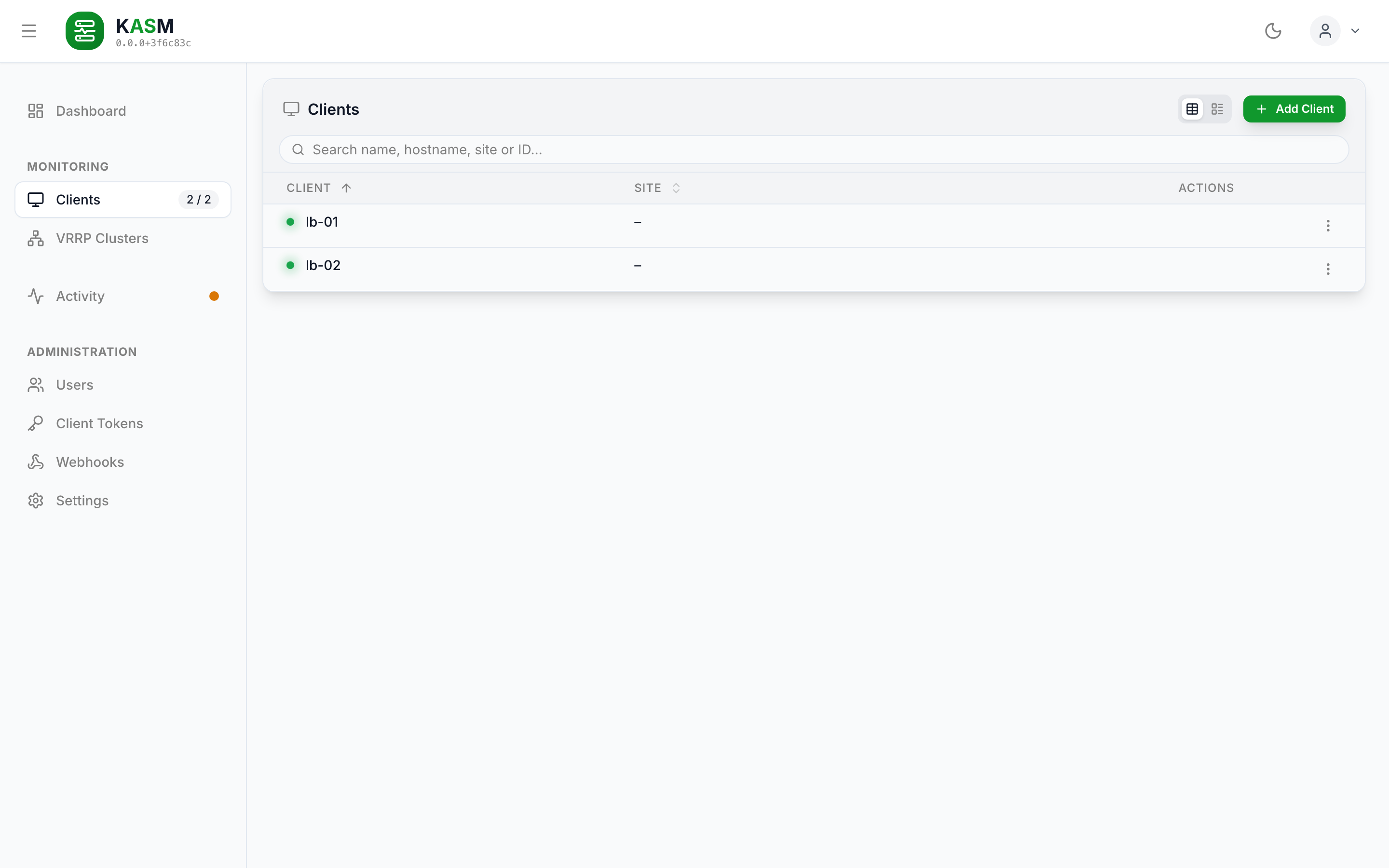
The client list at /clients: online dot, name and site per client, the row menu on the right.
The container component for the client management view. Coordinates between the client list, the editor and the add-client wizard.
- Functionality:
- Displays the list of registered clients (
ClientList). - Opens the client editor (
ClientEditor) for renaming a client, setting its site (part of the VRRP cluster key: hosts of one cluster need the same site), for inbound clients editing or switching off the address its connections must come from, and for outbound clients the address the server dials. Leaving with unsaved changes asks first, whichever way out is taken (see Forms). The draft is checked againstUpdateClientSchemafrom@kasm/shared, the schema the server parses the request with, so an address it would refuse is reported at its field; an address that was not touched is not sent and so stays savable. Server errors are shown in the form. An allowed address that would not letinboundLastIp— the address of the agent's last successful connect — back in is called out beneath the field, using the sameisIpAllowedthe server decides with. It does not block saving: the value is well-formed and the agent may have moved on purpose, so this is a consequence worth seeing, not a reason to refuse. - Opens the
AddClientWizard— one flow for both connection modes, replacing the former "Add Outbound Client" dialog and "Generate New Token" button. - The row menu's Reload asks the agent to read keepalived now, or — for an offline outbound client — dials it again.
- A keepalived column sums up the host's last reading:
2 instances · 1 MASTER, with FAULTs called out, or "Not running" / "Unreadable". - Deletes clients after a confirmation that says what goes (the server-side record and last keepalived reading) and what stays (keepalived on the host; the agent keeps running but is refused).
- Displays the list of registered clients (
Lists (DataMultiView)
Every list is one DataMultiView, and its columns are described once, as a
DataColumnDef[] passed as columns: the heading is also the list label, and one render
serves the table and the list. A column that belongs to one view only says so
(table: false, list: false), and the rare cell that has to differ reads the view its
render is given. The actions come from actionsColumn, the list's two blocks from
listGroups — both the library's. sort.defaultValue counts table columns, so a column
with table: false has no index.
ActivityView is the exception: it is a table on every screen, so it keeps a tableDef.
A columns array would give it a list view.
A list with nothing in it shows the library's EmptyState as its emptyMessage — an icon,
what is missing, and what makes entries appear. A search without a hit is a different
message, noResultsMessage: "No clients match …" must not read like a list nobody has added
to yet. The view can only tell the two apart when it does the filtering, so a list passes
all of its rows as data and its match function as searchFilter; rows filtered in front
of the view look like an empty list to it. A filter that is not the search — the activity's
level and seen state — is applied in front, and the list words its emptyMessage for it.
Dates and times (utils.ts, components/RelativeTime.tsx)
formatDate and formatTime write a date the way the browser's locale does; no locale
is fixed in the code. Both take a locale for a caller that must not depend on where it
runs, which is what the tests pass.
Where the question is "how recent", the date is written as its distance from now:
<RelativeTime date={…} /> shows just now, 5 min ago, 2 h ago, 3 d ago
(formatRelative), and the date itself in the tooltip. Past thirty days, and for a date
that lies ahead, it writes the date. It reads useNow, the page's one clock, so the text
moves on every 30 seconds without anything else re-rendering the row. Used for a client's
last seen, an instance's last transition, a host's and a cluster's last reading, and the
time of an activity entry. A date that is a fact rather than a distance — a token's expiry,
a user's creation, a scheduler's next run — stays a date.
LoadingIndicator (UI library)
"Something is on its way", for a view with nothing to show yet — a lazy route, the settings loading, a client's first keepalived reading. role="status" announces the label when it appears; the spinner is decorative.
StatusDot (UI library)
The dot that says whether the server currently holds a connection to a client — in the client list, the client header and the host column of every cluster.
It is the library's StatusDot and takes a tone, not a client's status: the caller maps its own word onto a role (success for a connected client, neutral otherwise), the appearance belongs to the component. Without a label the dot is aria-hidden, since every place that shows it also names the state in text.
AppLayout wraps the dashboard in StatusDotProvider with live bound to the WebSocket's isLost: a pulse says "this is happening now", and once the socket has been gone for five seconds no dot pulses. The same flag shows the ConnectionBanner.
Forms (hooks/useEntityForm, hooks/useUnsavedChangesGuard)
Every editor keeps the same three things: a draft, what it was when it was opened or last saved, and how the save went. useEntityForm holds them; each editor used to build them by hand.
- Checked before it is sent. The draft is turned into the request (
toInput) and parsed with the schema the backend parses that request with --WebhookInputSchema,UpdateClientSchema,CreateUserSchema. An issue is shown at its field (fieldOfmaps a request key to a draft field); what belongs to no field isformError.rulesadds what only the form knows, such as "a ticked restriction needs an address". - Errors appear with the first change. A form that was just opened has a disabled Save because there is nothing to save, not because a field is wrong.
- The rules are pure.
lib/entityForm.tsand thelib/*Form.tsmodule of a feature (clientForm,userForm,webhookForm,addClientForm) hold them apart from React, where the tests reach them.
useUnsavedChangesGuard(isDirty, editor) is the one place unsaved work is asked about. Every way out of a page goes through the router's blocker -- the close button, Cancel, Escape, an entry in the sidebar, the browser's back button -- so they all ask the same question (describeDiscardChanges in components/confirmations.ts). The editors used to ask only for their own close button and Escape; a click in the sidebar dropped the edits without a word. A reload or a closed tab is not a navigation the router sees, and gets the browser's own prompt (beforeunload). The blocker is why the routes run on a data router.
It returns close (leave for the parent in the route tree, asked about while dirty) and leave (the same without the question, for the navigation that follows a save).
| Surface | Form | Guard |
|---|---|---|
ClientEditor + ClientIdentityCard |
useEntityForm held by the editor, clientForm.ts |
yes |
WebhookEditor |
useEntityForm, webhookForm.ts |
yes |
UserDialog |
useEntityForm, userForm.ts |
no: a modal, not a route |
AddClientWizard |
useAddClientForm: two branches with a schema each, held above the steps |
yes, once anything was entered |
Settings |
its own draft per section, checked by sectionError |
yes, while any section is unsaved |
Dialogs
Modal from @stefgo/react-ui-components is what a dialog is built from. The three hand-built overlays that preceded it (fixed inset-0 bg-black/80 …) had no focus trap, no Escape, no scroll lock and no focus return.
UserDialogturnscloseOnOverlayClickoff: it holds unsaved input, and a stray click beside it should not discard the work.TokenModalturnscloseOnEscapeoff as well and hides the close button. The token is in the clear exactly once, so dismissing the dialog is not a way out but the loss of what the flow was for; the button below it is the only way on. The token stands in the library'sCopyField: over plain HTTP, where the browser has no clipboard, the button selects the token and says so instead of failing silently.
Editors that live in the workspace rather than in a dialog leave through useUnsavedChangesGuard, which also handles their Escape — see Forms.
Confirmations
Every question before an action, and every notice after a failed one, goes through useConfirm() from the library. ConfirmProvider sits next to ToastProvider in App.tsx and renders the one dialog that answers; no component keeps a pending request, a busy flag or a ConfirmDialog of its own, and no component calls window.alert or window.confirm.
confirm(options)resolvestrueorfalse. An action that is quick to hand off — a pull, a discard — runs after theawait.- An action whose outcome is worth waiting for — a delete — goes in
onConfirm. The dialog stays open and busy until it settles; a rejection keeps it open with the error inside it, next to the button that retries. That is why a delete is passed asmutateAsync, which rejects, rather than reporting the failure itself. alert(describeFailure(title, error))fromutils.tsreports a failure of an action that was not asked about first, such as the cleanups in Settings.
The texts live in a confirmations.ts per feature (activity, clients, tokens, users, webhooks), one describeX(...) per action, returning the complete options including variant. The one question every editor shares — "Discard your changes?" — lives in components/confirmations.ts, with one consequence line per editor. A component decides that it asks, never what the question says or whether it is danger. The reasoning behind a wording — what the agent really does, what stays on the host — is kept as a comment on its function.
AddClientWizard (features/clients/components/add-client)
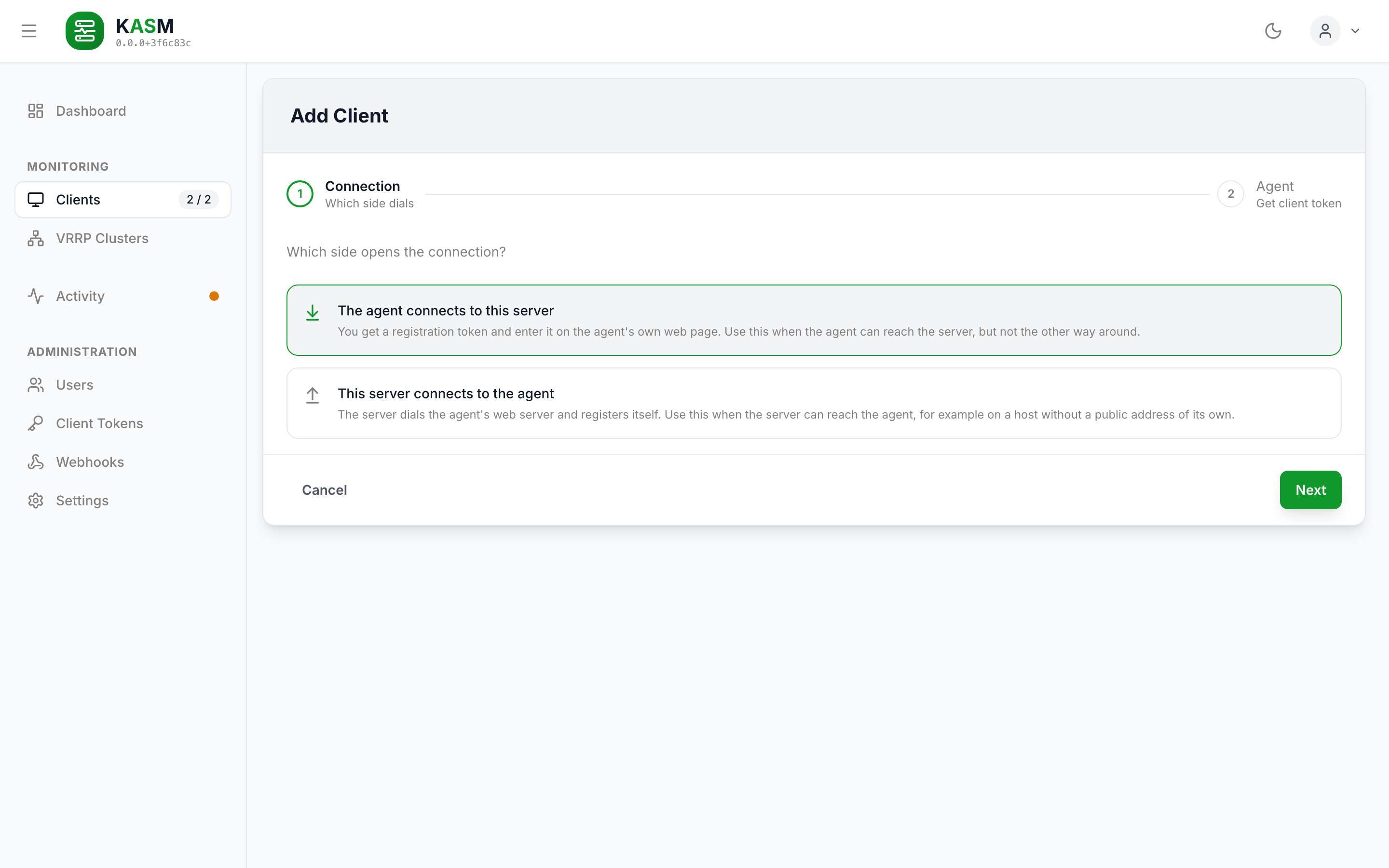
Step 1 of the wizard: the choice between an agent that connects inbound and one the server dials.
One flow for both connection modes, built on Wizard from @stefgo/react-ui-components. Step 1 is the decision about which side opens the connection; step 2 is the branch that follows from it. As two separate entry points this was a decision the operator had to have made before reaching a form.
It lives in the workspace rather than in a modal, because the two branches end in different things: a token to carry to another machine, or a connection attempt that may fail with a reason worth reading.
- Inbound branch: display name and allowed address for the client the token will create. Both optional — without them the agent's hostname names the client and the address it registers from becomes its allowed address. Ends in a
TokenModal, which shows the token once, lists what to do with it — open the agent's web page, paste it, register — and names what the token carries. - Outbound branch: hostname, target address and the agent's setup PIN (or its
KASM_REGISTRATION_SECRET); finishing dials the agent straight away, and a refusal is shown on the step with the agent's own reason. - The wizard renders only the current step, so the form state lives above it in
useAddClientForm— a step holding its inputs in its ownuseStatewould lose them on Back. - Cancel, Escape and every other way out ask first once anything has been entered (
hasAddClientInputinlib/addClientForm.ts). After the token was issued or the client was added, the flow leaves without a question. - Both fields that the server validates are checked in the form with the same functions the endpoints use (
Ipv4OrCidrSchema,normaliseTargetAddressfrom@kasm/shared). Escapeleaves the wizard. The listener sits onwindow, one level further out than menus and dialogs that listen ondocumentand stop the event there, so an open select closes itself without taking the wizard with it. It is off while the token is on screen: that dialog is acknowledged by button, because the token is shown exactly once.
ClientOverview (features/clients)
The detail view for a single client, shown when navigating to /clients/:clientId. An
EntityHeader names the client and keeps keepalived's state on screen as details —
running, unreadable or stopped with its version and PID, instances, MASTER, FAULT
(summarizeKeepalived). A FAULT count above zero is also a badge in the title row, and a
failed reading's error sits in the header's alert. The client's identity stays behind
"Show more" — id, agent version, allowed or target address, time of the last reading. Its
menu reads keepalived now (online clients only) and opens the editor.
Below it ClientKeepalivedPanel shows the last reading: the VrrpInstanceView and the sync
groups. A row opens the page of the instance's cluster, where its counters are.
An offline client shows a notice in place of its instances (lib/offlineNotice.ts):
since when it is gone and how old its last reading is. The instances stay away -- alone on
this page the last reading would read as current -- and the notice leads to the clusters
the host belongs to, where the same reading stands dimmed beside the hosts that still
report. The header keeps the client's identity behind "Show more", with the time it was
last seen in place of keepalived's state.
"Read keepalived now" answers with a toast: the reading itself arrives over the socket, and one that has not changed looks like a click that was not taken.
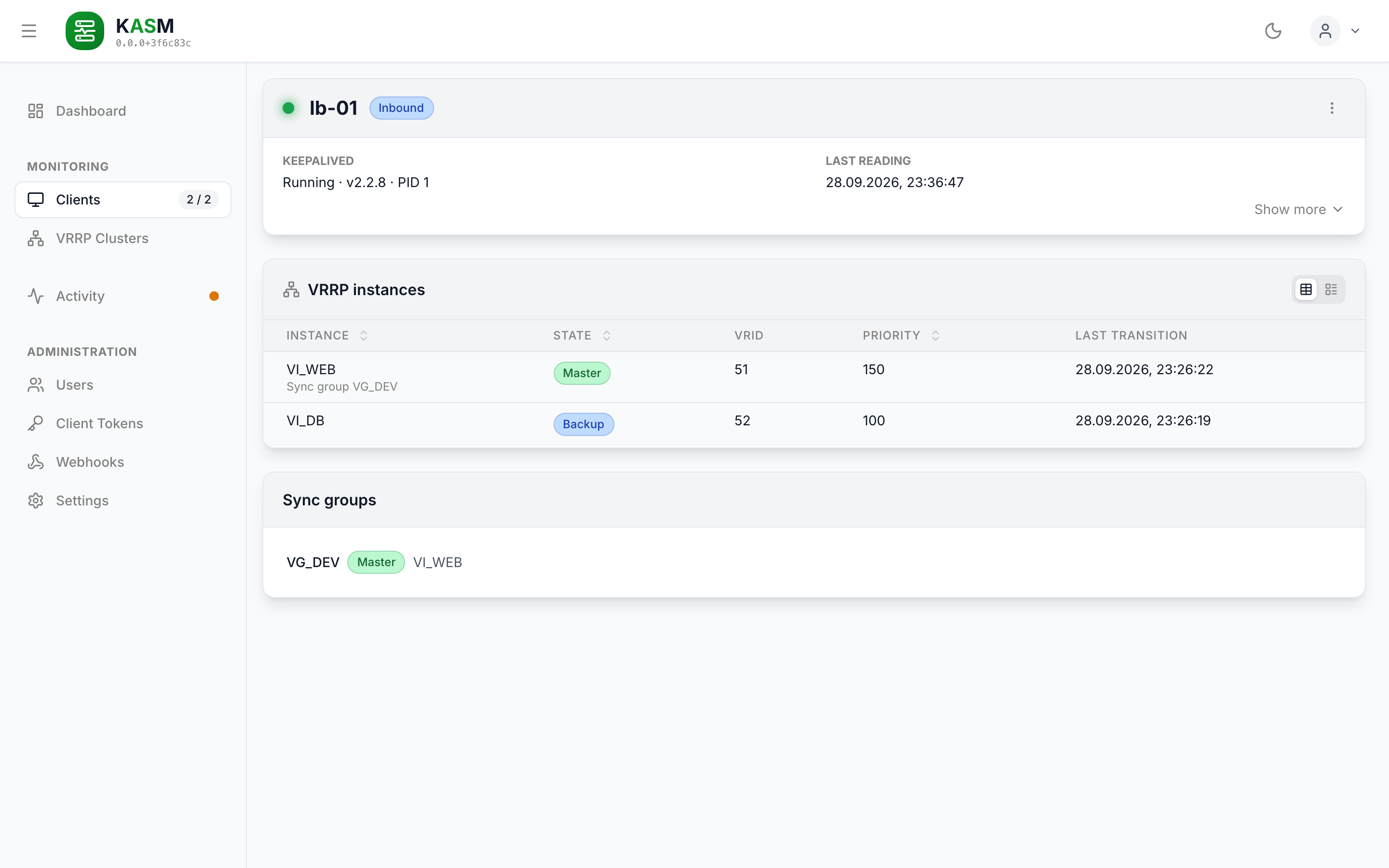
A client's page: keepalived's state in the header, the last reading's instances and sync groups below.
DashboardOverview (features/dashboard)
The landing page at /. Four StatCards — hosts online, VRRP clusters, MASTER and errors /
warnings (unseen activity rows at warning and above) — then, under the heading "Needs
attention", every cluster whose health is not ok.
Every card says below its number whether anything is wrong (hostSummary,
clusterSummary, problemSummary in lib/dashboard.ts): "All connected" or "2 offline",
"All healthy · 4 instances", "1 needs attention · 4 instances" or "1 unknown" for a cluster
whose agents are all offline, "None in FAULT" or
"1 in FAULT", "Nothing unseen" or "1 error · 2 warnings". Its icon takes the colour of
what it says — warning for an offline host or a cluster in trouble, error for a FAULT or an
unseen error — and is muted otherwise. A healthy fleet shows the four cards and nothing else.
Every card opens its list right beneath the cards — ClientList, ClusterOverview,
MasterList (each instance in MASTER on an online host: host, VRID, virtual IPs, state and
last transition; a row opens its cluster) and ActivityView with the level filter on
warning — and closes it on a second click. Only one list is open at a time and switching
clears the search, since all of them keep it in the same search parameter. The open list
is kept in the panel parameter (hosts, clusters, masters, activity), so it survives
a reload and a shared link opens it too.
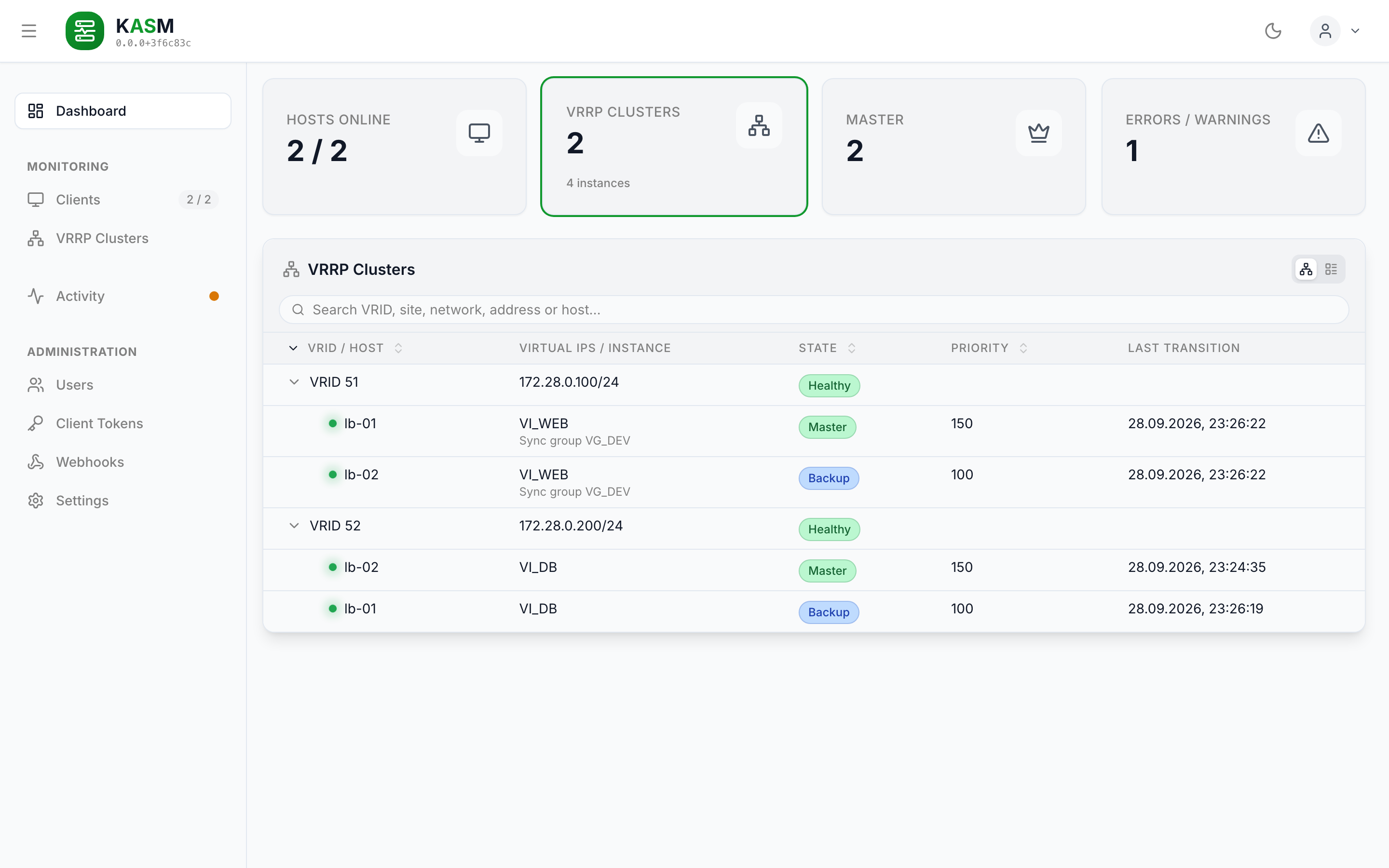
The dashboard with the VRRP clusters card opened (/?panel=clusters): two healthy clusters, each with its MASTER and BACKUP.
ClusterOverview & ClusterCard (features/keepalived)
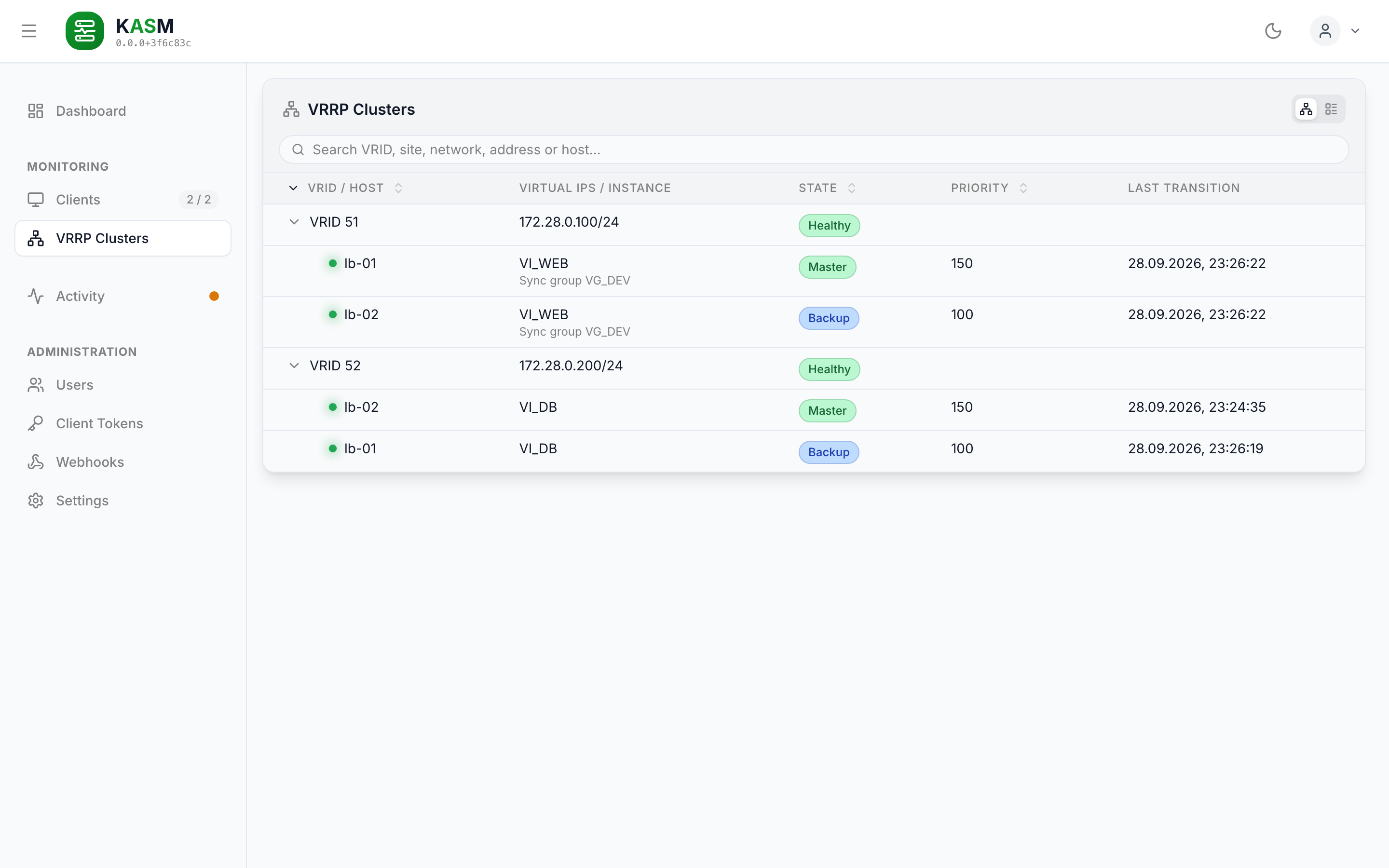
/clusters in tree mode: the virtual router on the first level, its hosts ordered by effective priority on the second.
/clusters is one DataMultiView in tree mode, the clusters needing attention first. The
first level is the virtual router — VRID, virtual addresses and the health badge
(CLUSTER_HEALTH in lib/vrrp.ts, with the explanation as the tooltip); the second level is
its hosts — online dot, link to the client, instance, VRRP state, priority — ordered by
effective priority, so the node that should be MASTER is on top. A cluster is expanded when it
needs a look — any health but ok, which includes an offline or inactive member — and, while
a search runs, so a matching host is not hidden. A cluster that runs into trouble opens by
itself; one the reader opened or closed by hand stays that way. A
member whose state is not current is dimmed (memberStale) and shows a red badge in place
of its state (MemberStateBadge, which renders MemberStatusBadge): "Offline" where its
agent is offline, "Not Active" where the agent is online but keepalived on the host is
stopped or unreadable. The last reported state moves into the badge's tooltip; a host row
always carries exactly one badge. The cluster page keeps both, state and red badge, side by side. Such a member stays
in the tree with the instance it last reported, instead of dropping out of the cluster. The
dimming is applied cell by cell, not to the row, so the badge itself stays at full contrast. A cluster row opens the cluster's page, a host row the host.
The search matches VRID, site, network, address, host and instance name and keeps a whole
cluster when one of its hosts matches. The list view, which narrow screens always get, is
the same tree with one line per row: a cluster by its addresses, which open its page, and
under it one row per host with its instance and state.
ClusterCard is the same cluster as a single card — VRID <vrid>: <virtual addresses> and
its health badge as its title, a VrrpInstanceView with a host column as its body,
where a row opens the host. It leaves out the VRID (showVrid={false}), which is part of the
cluster's identity and the same on every row. The virtual addresses are not: they belong to
the host that carries them, and a member serving a short list is read off them. Like the
interface and the advertisement interval, they are shown in the list view only — an address
list needs a line per row, which a table column cannot give it. The dashboard lists the
troubled clusters with this card; the cluster page uses it as its list of hosts, with a
plain title, since its header says the rest.
Clusters are derived, never fetched. useVrrpClusters runs buildVrrpClusters from
@kasm/shared over the readings from useKeepalivedStates and the online clients from
useClients. That is the function the server's /api/v1/keepalived/clusters runs, so the
page and the endpoint cannot disagree, and a client going offline changes a cluster's health
on the next render without anything being sent. Readings of clients that have since been
deleted are left out.
The server's clusters name a member by its client id. The hook adds hostName to every
member (nameMembers in lib/vrrp.ts) — the client's display name, its hostname while it
has none, the id for a client the list no longer holds. Every view reads the name off the
member, so the tree, its search and a sentence about the same host cannot differ.
ClusterDetail (features/keepalived)
One cluster at /clusters/<vrid>, or /clusters/<site>/<vrid> for clients with a site,
opened from a cluster row, a cluster card's title or an instance row on a client's page.
clusterPath in lib/paths.ts builds the address. A VRID is unique per broadcast domain
only: two segments of one site may use the same one, and only then does the path carry
?net= (clusterNetworkKey) to tell them apart. A bare path that fits several clusters
shows a list to pick from. A cluster without a VRID has no page.
- An
EntityHeaderwith site / VRID and the health badge. It carries four details, all of them shown: site, VRID and the network — what identifies the cluster — and the latest reading. Nothing hides behind a "Show more", so the header keeps nopersistkey. Everything that belongs to one host rather than to the cluster is read off the host table below: which one is MASTER, which are online, their instance names, interfaces, advertisement intervals, sync groups and virtual addresses. Offline hosts and members whose address list falls short are named in the header's alert. - The cluster's
ClusterCardas the list of hosts; a row opens the host. Itscompareprop turns on the library'sselection(handed throughVrrpInstanceView), which picks the hosts the counters are compared for: a checkbox in front of every row, and one for all of them in the table's header. The list view has no header and so no "all". - Counters side by side, one column per compared host, ordered by effective priority, the
counter column sticky while the rest scrolls. At first only the hosts that counted packet or
authentication errors are compared (
defaultCompareSelection); where none did, all of them are. Where a compared host counted errors, the table shows only the groups holding them; "Show all" in the card header brings back the others, "Show errors only" narrows it again. Only the reader's own picks are kept, in memory, so a host that joins later still gets the default. They are only worth reading together: what the MASTER sends, a BACKUP receives.groupCountersputs them into groups (advertisements, MASTER role, priority zero, packet errors, authentication errors) under one name whichever dump they came from — the text dump saysadvertisements_received, the JSON dumpadvert_rcvd, and one agent may send both. A counter this build does not know lands in "Other" rather than being dropped. An error count above zero is red. - What moved since the page was opened. keepalived's counters are sums since its start,
so a 3 that has stood for weeks looks like one that is counting. The page remembers what
each host reported when it first saw it (
rebaseCounters) and writes the difference beside the value,1204 +3. A host whose counter went down — keepalived was restarted — is measured from its new reading. The baseline lives in memory, per cluster; a reload starts it over. - The last 20 activity events of the cluster's instances, each led by its host, trace left out as on the activity page. Where all hosts name the instance alike, a link opens that page searching for the name.
A cluster no host reports any more shows a NotFoundCard leading back to the cluster list.
The instance page this one replaced, /client/:clientId/instance/:instanceName, is kept as
a redirect to the instance's cluster, so old links still land.
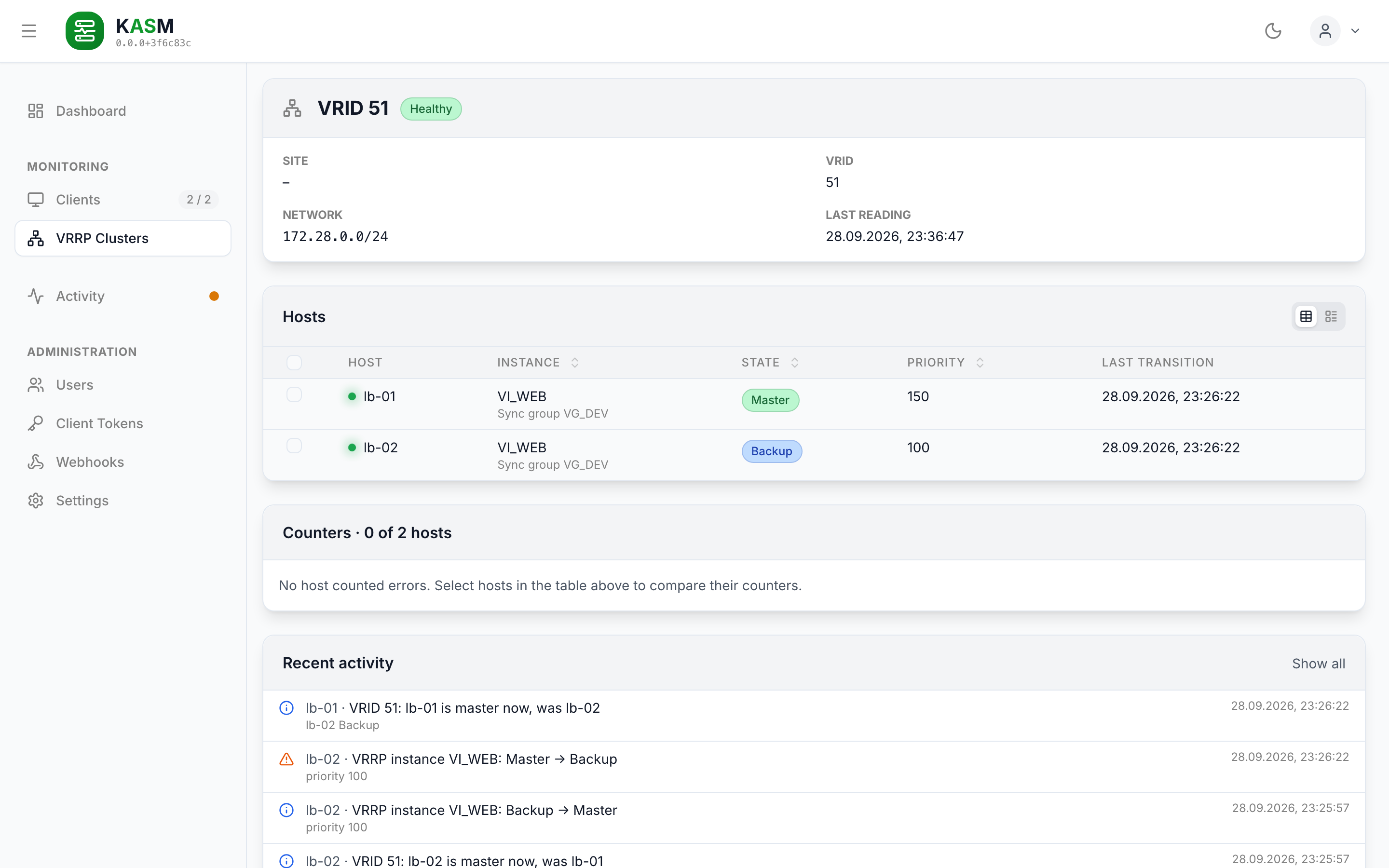
The page of one cluster: header, hosts, the counters of the selected hosts and the cluster's recent activity.
VrrpInstanceView & VrrpStateBadge (features/keepalived)
One view for a host's instances and for a cluster's members: instance (with its sync group),
state (with the configured state where it differs), interface, VRID, priority (configured →
effective where a track script moved it), advertisement interval, virtual addresses and the
last transition. A DataMultiView that shows them as a table or a list; interface and
advertisement interval are in the list only, to keep the table narrow. Every card has its
own toggle, and the choice is stored under one key (vrrpInstanceViewMode) for all of them.
A narrow screen always gets the list. Rows keep the caller's order until a column (instance,
state, priority) is sorted. A row with an href opens it and passes the current path as
from, which the page it opens uses as the way back. A row can bring its own state badge: the
cluster card passes MemberStateBadge, so a member whose agent is offline or whose keepalived
reports nothing shows "Offline" or "Not Active" in place of its state, with the last reported
state in the tooltip and the rest of the row dimmed — as in the cluster list. The configured
state is left out on such a row. VrrpStateBadge gives every state one colour, everywhere:
MASTER success, BACKUP info, FAULT error, INIT and STOP warning, the rest neutral.
/ puts the cursor into the search of the list on screen (hooks/useSearchHotkey, the rule
in lib/searchHotkey.ts): one listener in the shell, which takes the first visible
searchbox. In a field the slash is a character, and while a dialog is open the key is the
dialog's.
Escape on a detail page is handled by hooks/useEscapeToLeave and leads where useBackPath says. It does nothing while the focus is in a field, so Escape in a list's search box clears nothing and leaves nothing.
ActivityView (features/activity)
The page at /activity. Its entries are structured events: a kind, a level, what the
event is about and the facts of that kind.
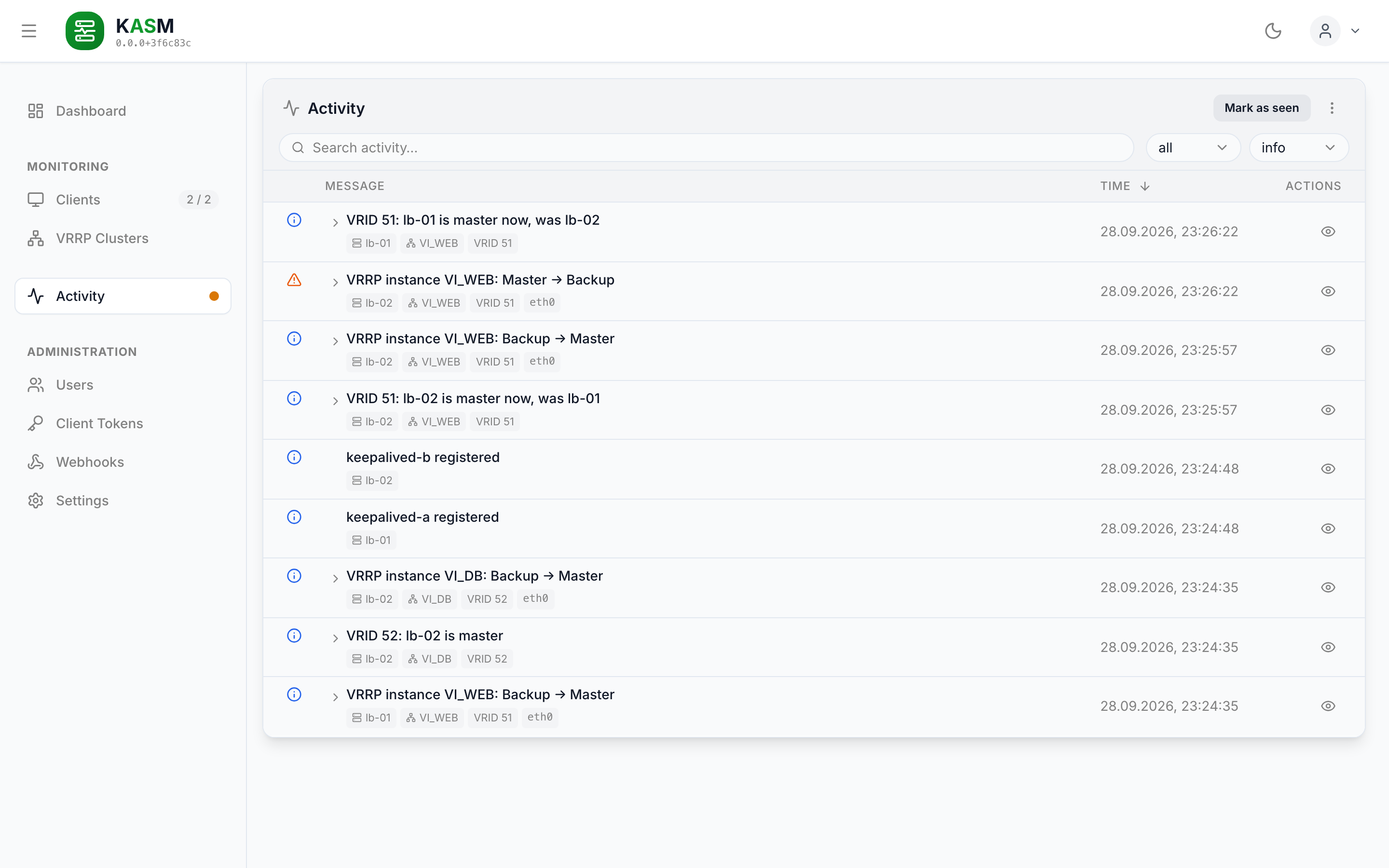
The activity after a failover of VRID 51, with the filters on all and info: the role events of the cluster and the state changes of each host.
The text is written in one place. activityText.ts in @kasm/shared is the one place a
wording exists — the webhooks send the same sentence as {{event.message}}: an agent
reports vrrp.state_changed with the two states and nothing else, and the sentence —
"VRRP instance VI_WEB: Master → Backup" — is composed from that. So an agent of an older version stays useful without knowing how today's
dashboard phrases things, a wording can be changed without asking a fleet of hosts to
update, and the level filter works on level rather than on a search through prose. A
kind this build does not know still gets a row — the fallback prints the kind itself, because
dropping the line would hide an observation nobody can make again.
Rows are groups. groupActivity.ts folds the flat list by correlationId: a summarising
event is the head, the rest are its expandable steps (ActivityGroupSteps, with an N steps
badge). Today the VRRP incidents are grouped this way: vrrp.incident_opened heads its
updates and its resolution, which share the incident's id; every other event is a row of its
own. The head carries the most
severe level in the group, so a run whose last step failed does not read as an untroubled
one. Grouping is a lookup, not a guess — whoever caused the group put its id on every member
— so nothing depends on arrival order and an event delayed by an offline stretch still lands
in its group hours later. A group with no head yet (an action still running) is stood in for
by its earliest member, so no event can go missing.
The level filter is a minimum, and its label says so: ≥ info. It sits at the right end of the search bar (searchActions)
and opens on what needs a look: error while an error is unseen, else warning while a
warning is, else info — the same rule as the sidebar badge. The start is fixed once the list
is known, so marking rows seen does not move the filter. trace events — agents connecting
and disconnecting — are hidden until trace is chosen.
A second filter hides what has been seen. Next to the level filter, Show: all /
Show: unseen switches between the whole list and the rows with something unseen in them;
under unseen a row leaves the list once it is marked seen. It starts at unseen.
"Mark as seen" follows the filter. It marks the unseen events of every row the level filter and the search leave, across all pages, and nothing the reader has not been shown.
A new problem is reported on whatever page is open. useProblemToasts, mounted in
AppLayout, raises a toast for an error or a warning that joins the list while the
dashboard is open, with the sentence the list shows. The list as it first arrives is what
was there before; no clock decides what is new. An error stays until it is dismissed, an
incident is reported once (by its correlationId), and more than three at a time are
counted in one toast (lib/problemToasts.ts).
Entries are not deleted one by one. A row can be marked seen; the history goes as a whole
("Delete all") or through retention. The sidebar badge does not
count them either. An event that names a host but carries no clientName (recorded before
the server stored it) gets the name from the client list (useClients) by clientId.
Everything else is found through the search box, as on the other lists (useSearchQueryParam,
so the query survives a reload). It matches the sentence a row shows, its detail line, the
kind, and the host, VRRP instance, VRID and interface the event is about — the latter three
are also shown as chips under the line. A chip is the way to what it names
(lib/activityLinks.ts): the host's to its page, the instance's and the VRID's to their
cluster, looked up among the clusters the hosts report now. A host that was deleted, or an
instance no reading holds any more, stays text. A group matches when
any of its events does, so a step is found under the operation it belongs to. The sidebar
badge counts single unseen events, not groups.
UserOverview (features/users)
Manages user accounts. Supports creating, editing, and deleting users via a UserDialog form, checked against CreateUserSchema; that a local account needs a password is said at the password field. Deleting asks first; the dialog states that a session the account already holds stays valid until it expires, because the API checks only the JWT. For the last remaining user a second dialog explains why it cannot be deleted instead of sending the request. UserList is a DataMultiView like every other list: search by username, a list view for narrow screens, pagination.
TokenOverview (features/tokens)
Lists registration tokens via TokenList — a DataMultiView with search over token hash, display name and address — and deletes them after asking. Tokens are issued in the AddClientWizard, not here: that is where the two defaults a token carries — display name and allowed address — are entered, and a second entry point would only produce tokens without them. The list shows a token by the first 12 characters of its SHA-256 hash (the full hash in the tooltip), since the server keeps nothing else; the token itself is shown once, in the wizard's TokenModal. It shows both defaults per token, or "From the agent" for a token that carries neither.
WebhookOverview & WebhookEditor (features/webhooks)
Its own entry in the sidebar, in the Administration group above Settings. WebhookList is a
DataMultiView like every other list — search over name and URL, table and list view — and
shows per webhook its target, its filters and how the last delivery ended, with the reason
of a failure. A row, or its Edit action, opens the editor; Delete asks first.
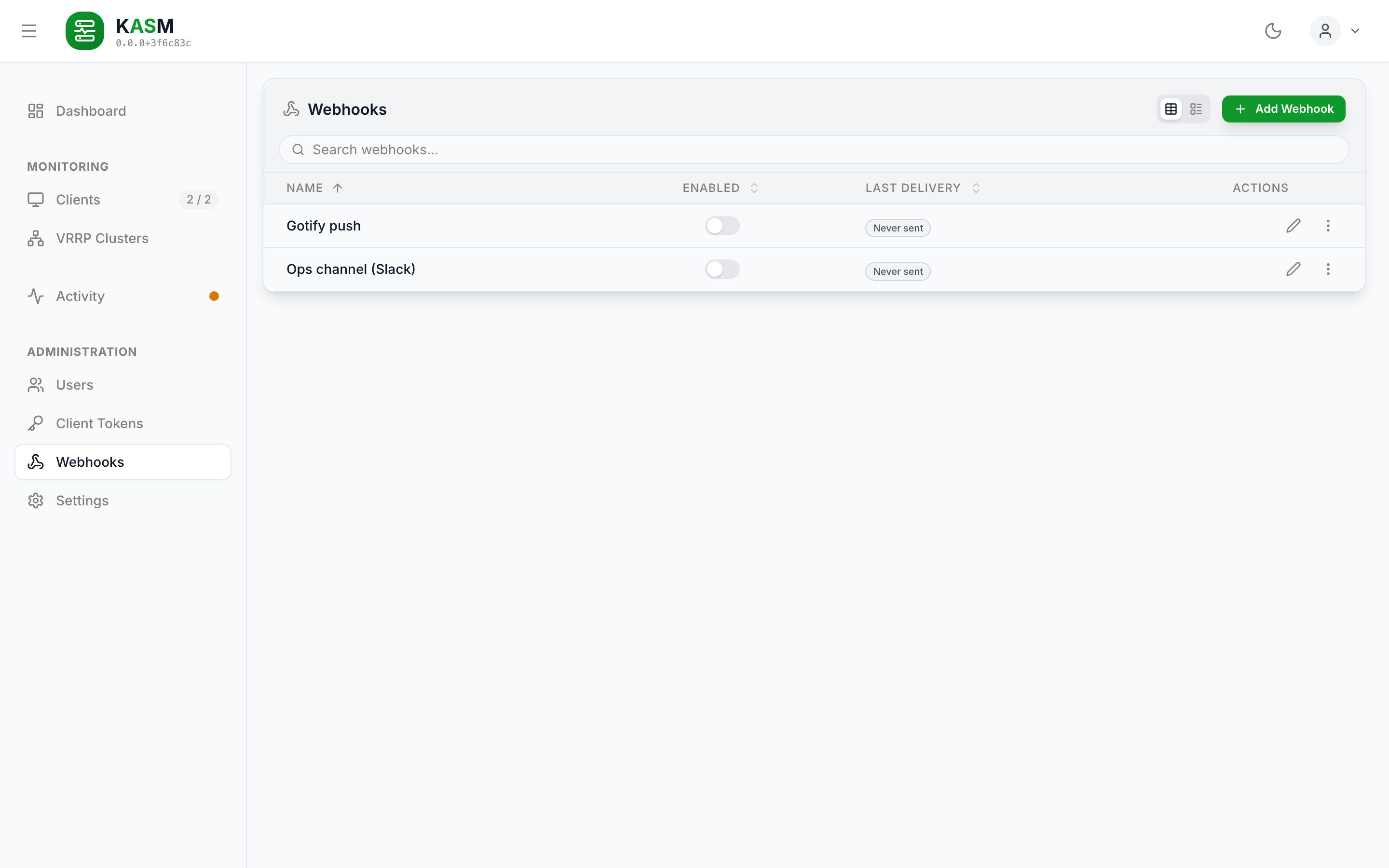
The webhook list; neither of these two has been sent yet.
The editor is a page, not a dialog, at /webhooks/new and /webhooks/:webhookId. It
leaves the way the ClientEditor does: every way out asks first when there are unsaved
edits and leads back to the list (useUnsavedChangesGuard); Save goes back after storing.
The draft is checked against WebhookInputSchema: each field says what it lacks, a header
line that is not Name: value is reported at the headers, and Save and "Send Test" stay off
until the draft is one the server takes. The webhook is read from
GET /api/v1/webhooks; an id that is not there throws NotFoundError. The preview is
rendered with renderTemplate from @kasm/shared — the code the server sends with — against
the sample event for the draft's kinds (sampleWebhookRecord, the one "Send Test" sends; its
kind is named above the preview), so the preview and the delivery cannot disagree. "Send Test" posts the
unsaved draft to /api/v1/webhooks/test. See Webhooks for the template syntax.
Settings (pages/Settings.tsx, features/settings)
System settings page, one section per tab: Client Tokens and Activity History. The tabs are the library's useTabs/TabList/TabPanel with a SideTab per section, the sections are built from its SectionHeader and NumberField, and the open tab is kept in the URL (?tab=). The sections live in features/settings/components; features/settings/sections.ts names the keys each one edits.
Every section saves on its own. Its Save sends only its own keys, and PUT /api/v1/settings/cleanup merges them into the stored block, so a section never writes over edits in another one. A tab with unsaved edits carries a dot, and leaving the page asks first for as long as any section has some; switching tabs is not leaving. A value the server would refuse is named beside Save before anything is sent (sectionError, against CleanupSettingsSchema). The manual maintenance runs act on the saved values, not on unsaved edits.
Every tab follows one layout: its settings, then one SchedulerBox headed "Scheduler". It shows Status (Running… or Idle), Last Run (with "manual" when a user started it), Next Run (or "Disabled") and Result, and, below a divider, the ManualRun row with its Run Now button. The box draws no field borders: its values are to read, not to edit. It reads useSchedulerStatus; the result is worded by describeRunResult (features/settings/lib/runResult.ts), in red for a failed or interrupted run. The settings page uses no monospaced type.
| Setting | Description |
|---|---|
token_retention_days |
Days to keep used/expired registration tokens before cleanup. |
token_cleanup_interval_hours |
Automatic token cleanup interval. 0 disables. |
notification_retention_days |
Days to keep activity events. |
notification_retention_count |
Minimum number of the newest activity events always kept. |
notification_cleanup_interval_hours |
Automatic activity cleanup interval. 0 disables. |
activity_level_overrides |
The level each event kind is recorded with, or none. One string; the Activity History tab edits it through one select per kind (features/settings/lib/eventLevels.ts), and "Default" names the level from ACTIVITY_DEFAULT_LEVELS. |
GET/PUT /api/v1/settings/cleanup— Fetch and save settings.POST /api/v1/settings/cleanup/invalid-tokens— Manually run the token cleanup.POST /api/v1/settings/cleanup/notifications— Manually run the activity cleanup.GET /api/v1/settings/scheduler-status— Status, last and next run of both schedulers.
How often an agent reads keepalived is not a server setting: it is keepalived.pollInterval
in the agent's own config.yaml, because the agent reads on its own clock whether or not the
server is reachable.
The client list's "Capabilities" column lists what the connected agent declared, as it named
it (vrrp); an offline client shows –, because capabilities belong to the build on the
wire, and a connected agent that declares none shows "None".
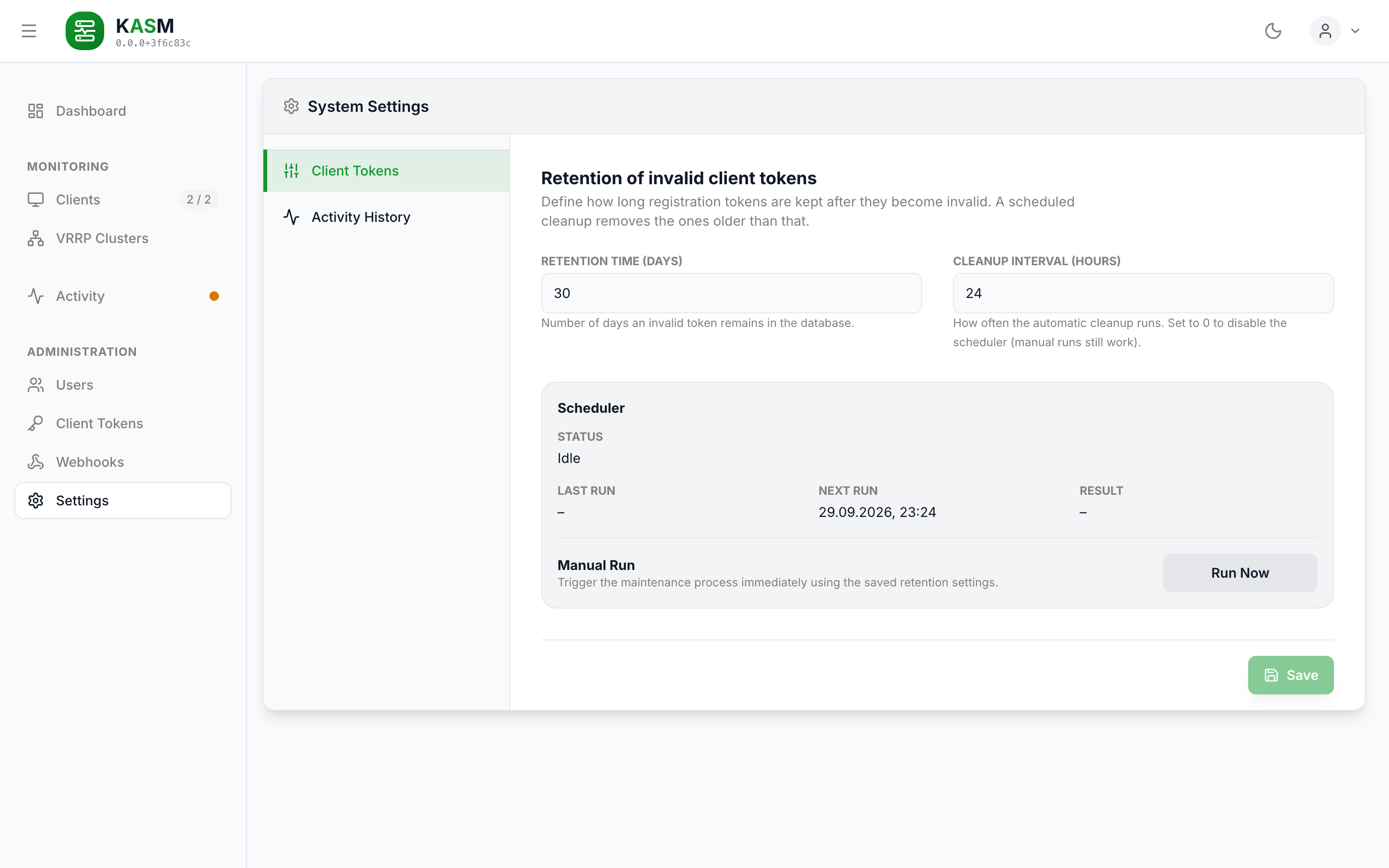
The Client Tokens tab: retention and interval of the cleanup, the scheduler's state and a manual run.
🎨 Styling & Theming
- Tech Stack: Tailwind CSS v3 with the
@stefgo/react-ui-components/tailwind-presetas the base configuration. - Dark Mode: Supported via the
classstrategy. Thedarkclass is applied to the<html>tag, controlled by the library'sThemeProvider, whichAppmounts withSTORAGE_KEYS.theme;useTheme()comes from the library as well. A colour is one class, not two:bg-cardresolves per theme because the preset redefines the custom property behind it in its.darkblock. The…-darktwins (dark:bg-card-dark) are gone with library 3.0, and the preset setsdarkModeitself. - UI Library: All generic components (Buttons, Inputs, Cards, Dashboard shell, etc.) come from
@stefgo/react-ui-components. Domain-specific components live insrc/features/. - Colours are roles, not palette values:
bg-success,text-error,text-warning,text-info,bg-error-bg. The library decides once what a role looks like in either theme, so a status dot cannot be a different green from one view to the next. Status pills are theBadgecomponent. - Custom Tailwind Extensions: the font family Inter, and nothing else. The font ships with the bundle (
@fontsource-variable/inter, imported inMain.tsx), so opening the application makes no request to another origin, and the server's CSP names none. The formerapp.text-footer(#444444) only existed to stay readable on a white panel, andshadow-glow-onlinewas a fixed green; the online dot usesshadow-glow-success, which the preset derives from the success token. - Tailwind Integration: Tailwind merges
darkModeandsafelistfrom the preset, but notcontent: acontentarray in the app's config replaces the preset's rather than extending it. The library's own glob is therefore spread back in, or every class only the library uses is missing from the output:
Working against a local checkout of the UI library
By default Vite, Tailwind and the type check all use the installed @stefgo/react-ui-components (pinned in server/frontend/package.json). A build must not depend on a sibling checkout that CI and the Docker build do not have.
To develop the library and the app together, set VITE_USE_LOCAL_UI=true in the shell (optionally VITE_UI_COMPONENTS_PATH, default ../../../react-ui-components relative to server/frontend):
| Tool | Installed package (default) | VITE_USE_LOCAL_UI=true |
|---|---|---|
| Vite | resolves the package from node_modules |
aliases the import to <path>/src/index.ts |
| Tailwind | preset and content glob from the package |
loads the checkout's tailwind-preset.js and scans <path>/src/**/*.{ts,tsx} |
| Type check | npm run typecheck -w server/frontend |
npm run typecheck:local-ui -w server/frontend (tsconfig.local-ui.json) |
Always switch all three together; otherwise the compiler checks one version of the library while Vite bundles another. Tailwind swaps the preset with the glob, because the preset carries the theme — on the installed preset a local build would run new components on the old theme. tsconfig.local-ui.json cannot read environment variables and uses the default path. compose.dev.yaml already sets VITE_USE_LOCAL_UI=true for the dev container.
📦 UI Library (@stefgo/react-ui-components)
The app is heavily integrated with @stefgo/react-ui-components, pinned to an exact version (4.7.0). Components used:
| Component / Type | Usage |
|---|---|
Dashboard |
App shell with sidebar, user menu, theme toggle. Renders navigation; the pages come from the app's routes as children. |
DashboardPage |
Type for a navigation entry ({ id, path, nav }). |
LoginPage |
Pre-built login form UI (local & OIDC). |
Card |
Generic surface card. padding="none" for a card that holds a table. |
StatCard |
Stat tile — the dashboard numbers (clickable, opening their list or page). |
Input |
Form input field. |
Button |
Button with variants (primary, secondary, danger). |
DataTable |
Table view with sorting and paging. |
DataMultiView |
Switches between table, list and tree views for data. |
DataColumnDef |
One column for table and list alike; with actionsColumn and listGroups. |
DataTableDef |
Column definitions for a view that is a table only (ActivityView, the counters). |
EmptyState |
An empty list: icon, what is missing, what fills it. |
DataAction |
Typed action descriptors for data row operations. |
ActionMenu |
Context ("kebab") menu for per-item actions. |
MenuItem |
One entry of a detail page's ActionMenu: icon, label, variant="danger" for an entry that destroys something. It closes the menu itself. |
useActionMenu |
Hook for ActionMenu state; supplies the trigger's anchor. |
useTabs / TabList / TabPanel |
The settings page's sections. See below. |
Modal |
The base every dialog is built from — focus trap, Escape, scroll lock, focus return. |
Wizard / WizardStep |
The step flow the AddClientWizard is built on. |
Select |
Dropdown in the forms. |
useToast / ToastProvider |
Transient result messages raised from the shell. |
cn |
Class-name join; the app uses it where it draws a surface itself. |
ConfirmProvider / useConfirm |
Every confirmation and failure notice. See Confirmations. |
Badge |
Status pill in one of five roles (success, warning, error, info, neutral). |
SideTab / SectionHeader / NumberField / ManualRun |
What the settings page is made of: a tab of the side list, a section's heading, a whole-number field clamped to its minimum, and "run the job now". |
Alert |
The box a refused save and the result of a webhook test are shown in. An error is role="alert", every other tone role="status". |
FieldLabel |
The caption of a stacked field, for something that is no library control: a read-only value, a switch. |
CopyField |
A value to take away next to the button that copies it: the registration token. |
ThemeProvider / useTheme |
Which theme is on, the class on <html> and the stored choice. |
StatusDot / StatusDotProvider / LoadingIndicator |
See StatusDot and LoadingIndicator. |
Checkbox |
Checkbox with label, indeterminate for a partial selection. |
ActionButton |
Round icon button with a tooltip — close, copy, expand, kebab. |
EntityHeader |
Header of the client page: title, badges, actions, and details that open on request. Whether they are open is kept in localStorage (STORAGE_KEYS.clientDetails). |
FOCUS_RING / FOCUS_RING_INSET / FOCUS_RING_NONE |
The focus ring for the few surfaces the app still draws itself: an inline chip, a tab, a menu entry. Every library component brings its own. |
The data views own sorting and paging. A view receives the complete set in data and takes the page after sorting, which is what makes a column sort cover every row instead of the ten on screen. The page state lives in the view, configured through the library's listPagination(PAGE_SIZE.…) — 20 rows for a list that is a page of its own, 10 for one inside a tab; usePagination is only for holding it outside, and the app does not need it. Sorting, search and view mode follow the same shape: sort={{ defaultValue: [...] }}, search={{ value, onChange }}, viewMode={{ persist: { key, scope: "local" } }} — the persistence vocabulary that replaced the bare storageKey in library 4.0; scope: "local" is what storageKey did, so a chosen view mode survived the move.
The tabs are the library's. The settings page drives its section list and the panels beside it from one useTabs({ tabs, value, onChange, orientation: "vertical" }): it supplies the roles, the tab-to-panel wiring, the roving tabindex and the arrow keys. TabPanel keeps a panel that has been opened once mounted (visited), so unsaved edits survive a switch away and back. The active tab itself is a URL parameter, so a reload and a shared link land on the same tab.