🪝 Webhooks
KASM can report activity events to external services — a chat channel, a push service, an incident tool, a script of your own. Each webhook sends a JSON body you write yourself, with placeholders for the data of the event that triggered it.
Webhooks are managed on the Webhooks page in the sidebar, under Administration. The API is described under Webhooks in the API reference.
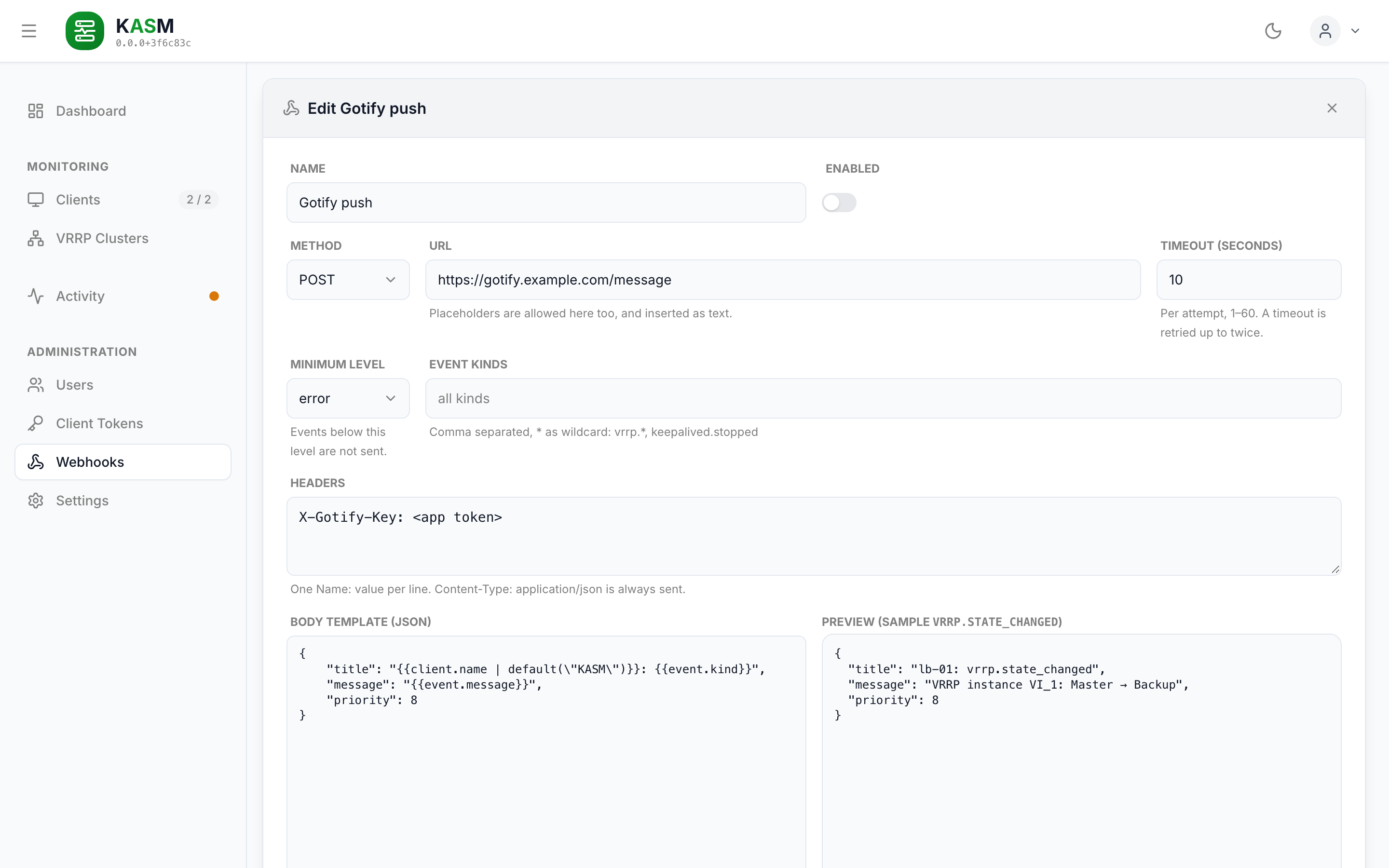
The editor: target, filters and headers above, the body template beside its preview, rendered against a sample event.
When a webhook fires
Every event the server stores for the first time goes to every enabled webhook whose filters it passes:
- Minimum level —
trace,info,warningorerror. The default,warning, covers a master giving up its role, a stopped keepalived and every error. - Event kinds — a comma-separated list of patterns,
*as wildcard:vrrp.*,keepalived.stopped. Empty means every kind. The kinds are listed in the Activity reference.
An event an agent delivers twice — it reconnects before it saw the acknowledgement — is stored once and reported once.
Delivery
POST(orPUT) withContent-Type: application/jsonand the headers you configured.- Per attempt the configured timeout applies (default 10 s). When nothing answers, or the target answers 5xx or 429, the delivery is tried twice more, after 1 s and 5 s.
- Events are sent to one target in the order they arrived.
- The outcome of the last delivery is shown in the list. A failure is logged, but does not create an activity event — a broken target would otherwise report its own failures to itself.
- There is no persistent queue. A server restart during a retry loses that delivery; the event itself stays in the activity list.
Templates
A template is valid JSON with {{…}} placeholders in its strings. It is filled in on the
parsed JSON, never as text, so a quote or a brace in an event's data cannot break the body.
| Written as | Becomes |
|---|---|
"{{event.data}}" — a string that is only one placeholder |
The value with its type: an object stays an object, a number a number, a missing value null. |
"Host {{client.name}} is {{event.data.to}}" — a placeholder inside text |
Text. A missing value is empty, an object is written as JSON. |
{{client.name \| default("server")}} |
The fallback when the value is missing, null or empty. The fallback is a JSON value ("text", 0, null) or text in single quotes ('text'). More filters below. |
{ "{{event.kind}}": … } |
Placeholders work in keys too, as text. |
Placeholders also work in the URL and in header values, always as text.
A path must start with event, client or webhook; anything else is refused when
the webhook is saved, as is a template that is not valid JSON or longer than 64 KiB. The
editor page shows a live preview rendered with a sample event, and Send Test delivers that
sample to the target. The sample follows the webhook's event kinds: the first of
vrrp.state_changed, vrrp.master_changed, vrrp.incident_opened, vrrp.incident_resolved
and keepalived.stopped one of them matches, vrrp.state_changed when none does.
What a template can read
| Placeholder | Content |
|---|---|
event.message |
The sentence the dashboard shows, e.g. VRRP instance VI_1: Master → Backup |
event.detail |
The dashboard's second line, such as a priority or an error; null if none |
event.kind |
vrrp.state_changed, keepalived.stopped, … |
event.level |
trace, info, warning or error |
event.occurredAt |
When it happened on the host (ISO 8601) |
event.receivedAt |
When the server received it |
event.source |
agent or server |
event.id |
Unique id of the event |
event.correlationId |
Groups events that belong together: the id of a VRRP incident; else mostly null |
event.subject |
{ instanceName, vrid, interface } for VRRP events; single fields as event.subject.vrid |
event.data |
The facts of the kind, e.g. { from, to, priority, effectivePriority }; single fields as event.data.to |
client.name |
Display name, else hostname |
client.hostname |
Hostname reported by the agent |
client.site |
The client's site |
client.id |
Client id |
webhook.name |
The webhook's own name |
client is null for an event the server reports about itself (scheduler.failed); use
default(...) where that matters. Which fields event.data carries per kind is listed in
the Activity reference. An array element is reached by its position:
event.data.cluster.members.0.host.
Filters
Filters follow the path, separated by |, and run left to right. They work everywhere a
placeholder does, URL and headers included.
| Filter | Does |
|---|---|
default(<value>) |
The value when the one before is missing, null or empty |
join(", ") |
An array as text, its items separated by the given text (", " when left out). Objects in it are written as JSON. |
map("host") |
From an array of objects, the one field of each: [{host: "lb-01"}, …] → ["lb-01", …] |
upper, lower |
Text in upper or lower case |
truncate(12) |
The first characters of a text, cut without an ellipsis. The number is required and at least 1. |
{{event.data.cluster.vips | join(", ")}}                    → 10.0.0.10/24, 10.0.0.11/24
{{event.data.cluster.members | map("host") | join(", ")}}   → lb-01, lb-02
{{client.name | default("server") | upper}}         → LB-01
{{event.id | truncate(8)}}                          → 3f2a9c1e
A filter handed a value it cannot work on — join on a number, upper on an object — passes
it on unchanged. An unknown filter is refused when the webhook is saved, as is a truncate
without a whole number.
Conditions and loops
For what a single placeholder cannot say — a line only when there was a previous master, one
line per host — a template uses directives: JSON objects with a key starting with $.
They borrow their names from JSON-e, and like everything else they
work on the parsed JSON, so they cannot break it either.
$if — takes then when the condition holds, else else:
{
    "previous": { "$if": "event.data.previousMaster", "then": "was {{event.data.previousMaster}}", "else": "first master" }
}
A branch that is left out drops what the directive stands for: the key in an object, the
item in an array (null for a whole template). The condition is one of
| Condition | Holds when |
|---|---|
path |
the value is there and not null, "", false, 0 or an empty array |
!path |
it is not |
path == 'MASTER', path != 'MASTER' |
the value is, or is not, equal to the one given — as a JSON value ("MASTER", 51, true, null) or text in single quotes. 51 and '51' are not equal. |
There is nothing beyond these: no and, no or, no arithmetic. Two conditions are two
nested $ifs.
$map — one item per element of an array, rendered with each(name), in which name
is the element; each(name, index) adds its position, counted from 0:
{
    "hosts": { "$map": "event.data.cluster.members", "each(m)": { "host": "{{m.host}}", "state": "{{m.state}}" } }
}
The path names the array without braces ("{{event.data.cluster.members}}" is accepted too) and
may carry filters. Anything but an array gives []. Loops nest, and an inner one can read the
outer one's name. A name may not be event, client, webhook or one already in use.
$join — renders what it holds and joins the resulting array into text, separated by
with (nothing when left out). That is how a loop becomes a message:
{
    "content": {
        "$join": {
            "$map": "event.data.cluster.members",
            "each(m)": {
                "$if": "m.online",
                "then": "- {{m.host}}: {{m.state}} ({{m.priority}})",
                "else": "- {{m.host}}: offline"
            }
        },
        "with": "\n"
    }
}
→ "- lb-01: MASTER (100)\n- lb-02: offline"
- An object holding a directive may hold only that directive's own keys (
then/else,each(…),with); two directives in one object are refused. - Directives nest at most 8 deep. A loop only ever runs over an array the event carries, so a template always finishes.
- A key that has to reach the target starting with
$if,$mapor$joinis written with a second$:"$$if"is sent as"$if". Other$keys, such as$schema, are sent as written.
Examples
Slack / Mattermost incoming webhook
Microsoft Teams (workflow webhook)
{
    "type": "message",
    "attachments": [{
        "contentType": "application/vnd.microsoft.card.adaptive",
        "content": {
            "type": "AdaptiveCard",
            "version": "1.4",
            "body": [
                { "type": "TextBlock", "weight": "Bolder", "text": "{{client.name | default(\"KASM\")}} ({{event.level}})" },
                { "type": "TextBlock", "wrap": true, "text": "{{event.message}}" }
            ]
        }
    }]
}
Gotify — URL https://gotify.example.com/message, header X-Gotify-Key: <app token>
{
    "title": "{{client.name | default(\"KASM\")}}: {{event.kind}}",
    "message": "{{event.message}}",
    "priority": 8
}
VRRP clusters report two things (see Cluster events): who holds them —
vrrp.master_changed, vrrp.split_brain, vrrp.master_lost, all info, their history — and
how they are doing, vrrp.incident_*, the kinds to alert on. All of them carry
event.data.cluster, the cluster as every live host confirmed it; the role events add
event.data.previousMaster, the incidents event.data.incident.
Failover summary — one message per change of who holds a VRRP cluster, with the new master
and the state of every host. Event kinds vrrp.master_changed, vrrp.split_brain, vrrp.master_lost,
minimum level info:
{
    "text": "{{event.message}}",
    "vrid": "{{event.data.cluster.vrid}}",
    "site": "{{event.data.cluster.site}}",
    "vips": "{{event.data.cluster.vips | join(\", \")}}",
    "master": "{{event.data.cluster.master}}",
    "previous": { "$if": "event.data.previousMaster", "then": "{{event.data.previousMaster}}" },
    "health": "{{event.data.cluster.health}}",
    "hosts": {
        "$map": "event.data.cluster.members",
        "each(m)": { "host": "{{m.host}}", "state": "{{m.state}}", "online": "{{m.online}}" }
    }
}
event.data.cluster.members holds host, state, priority, effectivePriority, online,
reporting, readAt and vips per member; "hosts": "{{event.data.cluster.members}}" sends
all of it. event.data.cluster.health is the dashboard's health. A new master is reported some
5 s after the failover, once every live host has confirmed it.
Incidents — one message when a cluster stops being healthy, one whenever its health or its
findings change (event.data.incident.added / cleared name what changed), one when it is
ok again. An agent going offline is no incident; all agents of a cluster offline for 60 s is
one (unreachable). event.data.incident.health is the incident's own health. Event kinds vrrp.incident_*, minimum
level info — the all-clear is info. event.correlationId is the same on all messages of
one incident, for a target that threads them.
Log Notifier for Home Assistant — URL
https://<ha>/api/lognotifier/ingest/<channel token>, event kinds vrrp.incident_*,
minimum level info. Log Notifier reads KASM's levels as its own and renders content and
the values in blocks as Markdown. The template raises the level to error for
split-brain, no-master and unreachable, says in one sentence what happened and puts the
findings, the cluster, its hosts and the course of the incident into blocks:
{
    "level": {
        "$if": "event.data.incident.health == 'split-brain'",
        "then": "error",
        "else": {
            "$if": "event.data.incident.health == 'no-master'",
            "then": "error",
            "else": {
                "$if": "event.data.incident.health == 'unreachable'",
                "then": "error",
                "else": "{{event.level}}"
            }
        }
    },
    "title": {
        "$join": [
            { "$if": "event.kind == 'vrrp.incident_opened'", "then": "🚨 " },
            { "$if": "event.kind == 'vrrp.incident_updated'", "then": "🔄 " },
            { "$if": "event.kind == 'vrrp.incident_resolved'", "then": "✅ " },
            "{{event.message}}"
        ]
    },
    "content": {
        "$if": "event.kind == 'vrrp.incident_resolved'",
        "then": {
            "$if": "event.data.incident.resolution == 'removed'",
            "then": "**Incident closed** — the cluster no longer exists (client deleted, site or network changed).",
            "else": "**Recovered** — every live member confirmed a healthy cluster."
        },
        "else": {
            "$if": "event.kind == 'vrrp.incident_updated'",
            "then": "**Incident changed** — the cluster is now **{{event.data.incident.health}}**.",
            "else": "**Incident opened** — the cluster is **{{event.data.incident.health}}**."
        }
    },
    "blocks": [
        {
            "type": "fields",
            "rows": [
                [
                    { "$if": "event.data.incident.added", "then": {
                        "label": "New findings",
                        "value": { "$join": { "$map": "event.data.incident.added", "each(t)": "- 🆕 {{t}}" }, "with": "\n" }
                    } },
                    { "$if": "event.data.incident.cleared", "then": {
                        "label": "Cleared",
                        "value": { "$join": { "$map": "event.data.incident.cleared", "each(t)": "- ✅ ~~{{t}}~~" }, "with": "\n" }
                    } }
                ],
                [
                    { "$if": "event.data.incident.reasons", "then": {
                        "label": "Open findings ({{event.data.incident.health}})",
                        "value": { "$join": { "$map": "event.data.incident.reasons", "each(r)": "- ⚠️ {{r.text}}" }, "with": "\n" }
                    } }
                ]
            ]
        },
        {
            "type": "fields",
            "rows": [
                [
                    { "label": "Site", "value": "{{event.data.cluster.site | default('–')}}" },
                    { "label": "VRID", "value": "{{event.data.cluster.vrid}}" },
                    { "label": "Master", "value": "**{{event.data.cluster.master | default('none')}}**" }
                ],
                [
                    { "label": "VIPs", "value": "{{event.data.cluster.vips | join(', ')}}" }
                ]
            ]
        },
        {
            "type": "fields",
            "rows": {
                "$map": "event.data.cluster.members",
                "each(m)": [
                    {
                        "label": "{{m.host}}",
                        "value": {
                            "$if": "m.online",
                            "then": {
                                "$if": "m.reporting",
                                "then": {
                                    "$if": "m.state == 'MASTER'",
                                    "then": "🟢 {{m.state}}",
                                    "else": { "$if": "m.state == 'FAULT'", "then": "🔴 {{m.state}}", "else": "🔵 {{m.state}}" }
                                },
                                "else": "🟠 keepalived not reporting, last {{m.state}}"
                            },
                            "else": "⚫ agent offline, last {{m.state}}"
                        }
                    },
                    {
                        "label": "Priority",
                        "value": {
                            "$if": "m.reporting",
                            "then": "{{m.effectivePriority}} / {{m.priority}}",
                            "else": "–"
                        }
                    }
                ]
            }
        },
        {
            "type": "fields",
            "rows": [
                [
                    { "label": "Opened", "value": "{{event.data.incident.openedAt}}" },
                    { "$if": "event.data.incident.durationSeconds", "then": {
                        "label": "Duration",
                        "value": "{{event.data.incident.durationSeconds}} s"
                    } },
                    { "$if": "event.kind != 'vrrp.incident_opened'", "then": {
                        "label": "History",
                        "value": {
                            "$join": [
                                "{{event.data.incident.history | join(' → ')}}",
                                { "$if": "event.data.incident.resolution == 'recovered'", "then": " → ok" }
                            ]
                        }
                    } }
                ],
                [
                    { "label": "Incident", "value": "{{event.correlationId}}" }
                ]
            ]
        }
    ],
    "source": "kasm",
    "tags": [
        "kasm",
        "{{event.kind}}",
        "{{event.data.incident.health | default('removed')}}",
        "vrid-{{event.data.cluster.vrid}}",
        "{{event.data.cluster.site | default('no-site')}}"
    ],
    "timestamp": "{{event.occurredAt}}"
}
Your own endpoint, with the complete event
{
    "source": "kasm",
    "host": "{{client.hostname}}",
    "site": "{{client.site}}",
    "event": {
        "id": "{{event.id}}",
        "kind": "{{event.kind}}",
        "level": "{{event.level}}",
        "at": "{{event.occurredAt}}",
        "subject": "{{event.subject}}",
        "data": "{{event.data}}"
    }
}
Security
- Header values — typically a token — are stored in the clear in the server database and shown in the editor to every user who can log in. Everyone with a login can manage webhooks, just as they can manage everything else.
- The server makes the requests, so it can reach whatever the server can reach, internal addresses included. That is intended for targets on the internal network; keep it in mind when handing out logins.
- The log names a failing webhook and the reason, never its headers.